
That persistent yellow tire pressure warning light on your Mazda dashboard can be more than just annoying—it’s a critical safety alert demanding attention. When the tire pressure monitoring system (TPMS) warning illuminates, it means one or more of your tires has dropped significantly below Mazda’s recommended inflation levels. Many drivers make the mistake of simply trying to reset the light without addressing the underlying pressure issue, only to have it return minutes later. This comprehensive guide shows you exactly how to properly reset your Mazda’s TPMS after correcting tire pressure, ensuring the warning light stays off and your vehicle maintains accurate monitoring. You’ll learn the specific initialization procedures for different Mazda models, common mistakes that keep the light illuminated, and essential maintenance habits to prevent future warnings.
Identify Your Mazda Tire Pressure Warning Pattern

Before attempting any reset, you must determine what your TPMS light is actually telling you. Mazda’s system uses distinct warning patterns that indicate different problems requiring specific solutions.
Low Pressure vs. System Malfunction Indicators
When your Mazda’s tire pressure light stays steadily illuminated, this signals one or more tires is significantly under-inflated. This is your cue to stop safely and check all tire pressures immediately. Continuing to drive on under-inflated tires creates dangerous heat buildup that can lead to tire failure, especially at highway speeds. Under-inflation also reduces your vehicle’s braking performance and handling capabilities while accelerating tread wear and decreasing fuel efficiency.
If your tire pressure light flashes for approximately one minute then remains steadily illuminated, this indicates a TPMS system malfunction rather than low tire pressure. This flashing sequence will repeat each time you start your vehicle as long as the malfunction persists. A flashing warning light means your system may not detect actual low pressure conditions, making regular manual pressure checks absolutely essential until the issue is resolved.
Why Mazda Uses Indirect TPMS Monitoring
Unlike some vehicles with direct pressure sensors inside each tire, most Mazda models use an indirect TPMS system that analyzes data from the ABS wheel speed sensors. This technology detects subtle differences in wheel rotation speed that indicate pressure variations between tires. Because it relies on relative comparisons between tires rather than absolute pressure measurements, your Mazda’s system must be properly initialized after any tire pressure adjustment or tire rotation to establish new baseline readings. Without this critical step, the system cannot accurately detect future pressure issues.
Locate and Verify Correct Tire Pressure Specifications
Many drivers fail to reset their Mazda’s tire pressure light successfully because they inflate to the wrong pressure values. The critical information you need isn’t on the tire itself—it’s on your vehicle’s specific placard.
Find Your Mazda’s Exact Pressure Requirements
Check the driver’s side door jamb, inside the fuel door, or consult your owner’s manual for the tire pressure label specific to your Mazda model. This label shows the manufacturer’s recommended cold inflation pressure, typically ranging from 32-35 PSI for most Mazda vehicles. Never use the maximum pressure printed on the tire sidewall—this represents the tire’s safety limit, not your vehicle’s optimal operating pressure. The recommended pressure balances handling, braking performance, fuel efficiency, and tire longevity for your specific Mazda model.
Proper Tire Pressure Check Technique
Always measure tire pressure when tires are cold—meaning the vehicle hasn’t been driven more than 1-2 miles. Driving heats the air inside tires, creating artificially high readings that can be 4-6 PSI above actual cold pressure. Remove each valve cap, press your gauge firmly onto the valve stem, and check the reading. Compare each tire’s actual pressure to your Mazda’s specifications, noting any discrepancies. Don’t forget to check your spare tire if your model monitors it through the TPMS system.
Inflate Tires to Factory Specifications Before Resetting
Correcting tire pressure to Mazda’s exact specifications is the non-negotiable first step before attempting any reset procedure.
Why Proper Inflation Matters Beyond the Warning Light
Under-inflated tires create excessive flexing in the sidewall, generating dangerous heat buildup that can lead to tread separation or blowouts. Even a 6 PSI reduction from recommended pressure decreases tire life by 25% and reduces fuel economy by approximately 0.3% per PSI. Mazda engineers determined your vehicle’s optimal pressure through extensive testing—deviating from these specifications compromises safety, performance, and efficiency regardless of whether the warning light is illuminated.
Step-by-Step Pressure Adjustment Process
- Use a high-quality digital tire gauge for accurate readings (avoid cheap stick gauges)
- Inflate each tire to the exact cold pressure specified on your door jamb label
- Recheck pressure after inflation to confirm accuracy
- Replace all valve caps securely to protect valve stems from debris and moisture
- Wait 10 minutes before attempting reset to allow tire pressure to stabilize
Execute Mazda-Specific TPMS Initialization Procedure
This is where most Mazda owners fail—simply inflating tires isn’t enough. You must formally initialize the system to recognize the new pressure baseline.
Model-Specific Reset Instructions
For Mazda Models with Multi-Information Display (2014+ CX-5, Mazda3, Mazda6):
1. Turn ignition to “ON” position without starting engine
2. Press the “Menu” button on steering wheel
3. Navigate to “Vehicle Settings” > “TPMS” > “Initialize”
4. Confirm initialization when prompted
5. Watch for “TPMS Initialized” message before starting vehicle
For Older Mazda Models Without Menu System:
1. Turn ignition to “ON” position
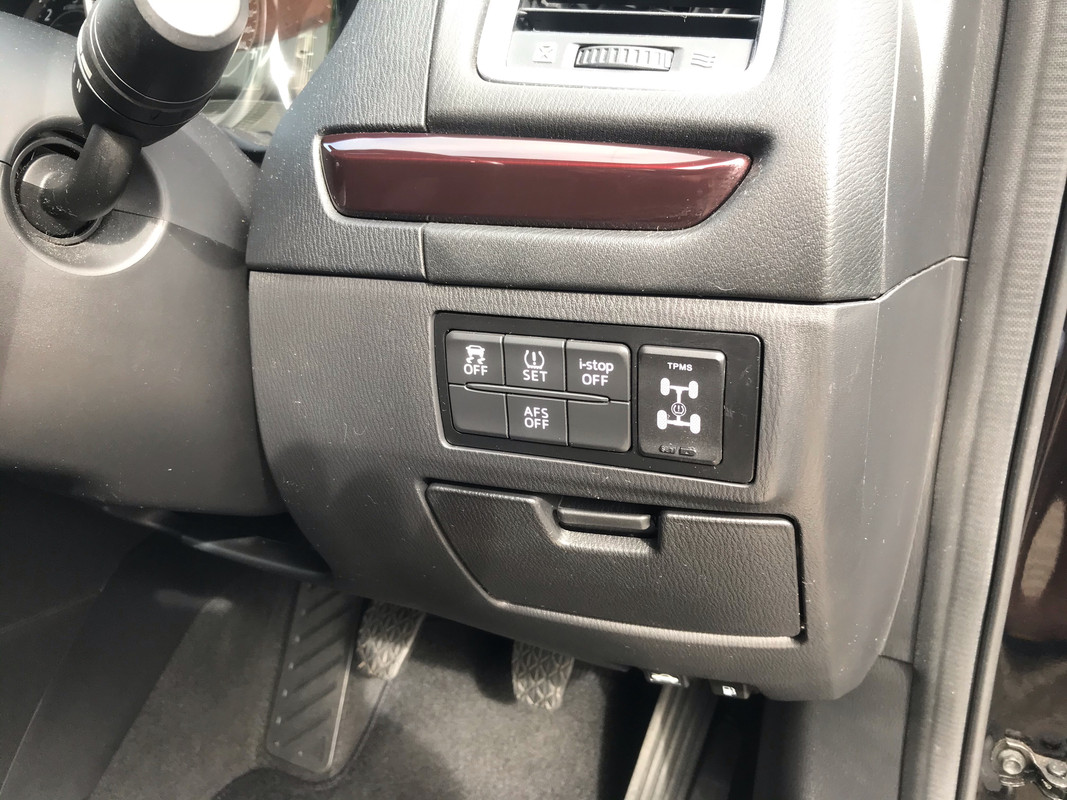
2. Locate the TPMS reset button (typically near gear shifter or under steering column)
3. Press and hold for 3 seconds until tire pressure light blinks three times
4. Start engine and verify light turns off after driving
Critical Note: Some Mazda models require professional initialization with diagnostic equipment. If your vehicle doesn’t have a menu option or reset button, consult your owner’s manual or visit a Mazda dealer.
Complete the Reset with Proper Driving Pattern
Initialization alone isn’t sufficient—your Mazda needs driving data to verify stable tire conditions.
Required Driving Protocol After Initialization
After completing the initialization procedure, drive your Mazda for 10-15 minutes at speeds above 20 mph to allow the ABS wheel speed sensors to collect sufficient data. Maintain smooth acceleration and braking during this period, as aggressive driving can interfere with the system’s calibration process. The TPMS needs this driving cycle to confirm that all tires maintain consistent rotation speeds at normal operating temperatures before it will extinguish the warning light.
Warning: If the light remains illuminated after completing this driving cycle, do not ignore it—your system has detected either an actual pressure issue or a malfunction that requires professional diagnosis.
Troubleshoot Persistent Mazda Tire Pressure Light Issues
When the warning light refuses to turn off despite proper inflation and reset attempts, specific underlying problems may exist.
Common Causes of Non-Resetting TPMS Lights
- Incompatible aftermarket wheels or tires that interfere with the indirect monitoring system
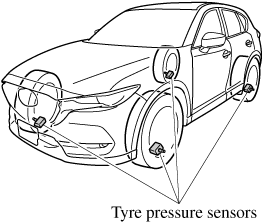
- Damaged TPMS sensors (in models that use direct monitoring)
- Electrical issues in the TPMS circuitry or ABS system
- Incorrect initialization procedure for your specific Mazda model year
- Significant temperature changes that cause pressure fluctuations
If your tire pressure light continues flashing after initialization, this specifically indicates a system malfunction where the TPMS cannot reliably detect low pressure conditions. In this scenario, immediately schedule professional diagnosis at a Mazda dealership or qualified service center, as you can no longer rely on the warning system for safety alerts.
Establish Long-Term Tire Maintenance Habits
Preventing future TPMS warnings requires consistent maintenance practices that go beyond simply resetting the light.
Monthly Tire Care Routine That Prevents Warnings
- Check all tire pressures monthly when cold using a quality digital gauge
- Inspect tires for nails, punctures, or slow leaks during each pressure check
- Rotate tires every 5,000-7,500 miles to ensure even wear
- Monitor seasonal pressure changes—tire pressure drops approximately 1 PSI for every 10°F temperature decrease
- Never wait for the warning light—regular manual checks catch gradual pressure loss before it triggers alerts
The TPMS is designed as a supplementary safety feature, not a replacement for regular tire maintenance. Significant pressure loss can occur without triggering the warning if it happens gradually, reducing fuel efficiency and tire life while compromising safety. By establishing these simple monthly habits, you’ll keep your Mazda’s TPMS functioning properly while maximizing tire longevity and vehicle safety.
Resetting your Mazda’s tire pressure light requires addressing actual pressure issues first, inflating to factory specifications, performing the correct model-specific initialization, and completing the required driving cycle. Never ignore a persistent warning light—proper TPMS function is critical for safety. Monthly manual pressure checks prevent future warnings and extend tire life by up to 25%, keeping your Mazda operating safely and efficiently.


