
Imagine pulling into a gas station on a crisp morning, ready to check your Hyundai Elantra’s tire pressure, only to realize you’ve forgotten your tire gauge at home. Before you panic or drive away hoping for the best, know that your Elantra already has the answer right in front of you. Modern Hyundai Elantras come equipped with an advanced tire pressure monitoring system that displays real-time pressure readings for all four tires directly on your instrument cluster—no external tools required. This built-in feature transforms what used to be a cumbersome monthly chore into a quick glance while buckling your seatbelt.
Understanding how to see tire pressure on Hyundai Elantra models eliminates the guesswork from tire maintenance and provides critical safety information at a moment’s notice. Whether you’re preparing for a long road trip, noticing unusual handling, or simply performing routine vehicle checks, accessing these readings takes mere seconds and could prevent a dangerous blowout or costly tire damage. This guide reveals exactly where to find these readings, how to customize the display to your preference, and what to do when the numbers don’t match manufacturer specifications.
Locate the Tire Pressure Display Controls

Your Hyundai Elantra’s tire pressure information lives within the instrument cluster display, accessible through steering wheel controls that vary slightly depending on model year. For 2017-2020 models, press the left-side steering wheel button marked with a car icon and four dots (representing tires) to cycle through display modes until you reach the Utility view. Newer 2021-2024 Elantras use a different interface: press the “Display” button on the left steering wheel cluster, then scroll through options using the toggle switch until “Tire Pressure” appears.
Find the Correct Display Mode by Model Year
If you’re driving a 2016-2019 Elantra, the tire pressure display appears within the Multi-Information Display (MID) when you select “Utility” mode. This view shows all four tires simultaneously with their current pressure readings. The 2020-2024 models integrate this information into the larger digital instrument cluster, where pressing the “View” button cycles through driving data screens until you reach the tire pressure section—typically the third or fourth screen in the rotation.
Identify Warning Indicators on the Display
When viewing your tire pressure readings, pay attention to color coding that instantly communicates tire status. Green numbers indicate pressure within 1-2 psi of the recommended level, while yellow warnings appear when pressure drops 3-5 psi below specification—time to add air soon. A red warning light combined with flashing tire pressure readings means one or more tires are 6+ psi underinflated, requiring immediate attention before continuing your journey. These visual cues make interpreting your Elantra’s tire pressure data intuitive even at a glance.
Access Tire Pressure Settings Through Infotainment System
To customize how your Elantra displays tire pressure readings, you’ll need to navigate through the infotainment system settings. Start by tapping the “Settings” icon on your center display screen—this resembles a gear symbol and appears on the home screen regardless of which app you’re using. From the main Settings menu, select “General” (sometimes labeled “Vehicle” on newer models), which contains vehicle-specific configuration options separate from media and phone settings.
Navigate to Unit Settings Menu
Within the General settings menu, scroll down until you find “Unit Settings” or “Display Units”—the exact wording varies by model year but always relates to measurement formats. Tap this option to access the submenu where you can adjust how various vehicle measurements appear across all displays. This centralized approach means changing your tire pressure unit here will affect readings both in the instrument cluster and infotainment system, ensuring consistency throughout your vehicle’s interface.
Select Your Preferred Pressure Measurement
The critical option you’re looking for is labeled “Tire Pressure Unit” or “Tyre Pressure Unit” depending on your vehicle’s regional configuration. Tap this setting to reveal three available measurement standards: psi (pounds per square inch), kPa (kilopascals), and bar. Most North American drivers prefer psi since gas station air pumps use this standard, while European drivers often select bar or kPa. Choose your preference and exit the menu—the change takes effect immediately without requiring a system restart.
Understand What the Numbers Mean
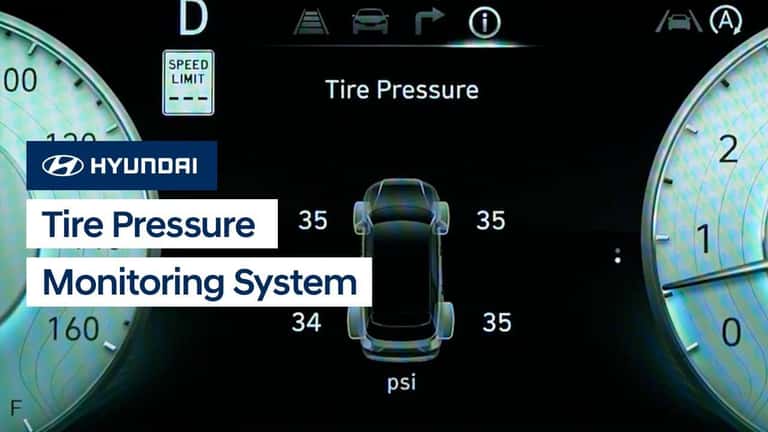
Your Elantra displays tire pressure readings in real-time, but these numbers only become meaningful when compared against manufacturer specifications. The system shows individual readings for each tire position—front left, front right, rear left, and rear right—allowing you to identify which specific wheel needs attention. For example, if your display shows “FL: 29 psi, FR: 29 psi, RL: 28 psi, RR: 24 psi,” you immediately know the rear right tire requires inflation.
Recognize Normal Pressure Fluctuations
Temperature changes cause natural tire pressure variations that don’t necessarily indicate problems. Expect readings to drop approximately 1 psi for every 10°F decrease in ambient temperature—so a tire reading 32 psi on a 75°F day might show 29 psi on a 45°F morning. Your Elantra’s monitoring system helps distinguish between these normal fluctuations and actual air loss. If low readings return to normal as temperatures rise, you’re likely experiencing thermal effects rather than a leak.
Identify Problematic Readings
When any tire shows pressure more than 3 psi below the recommended specification, it’s time to investigate. Consistently low readings in one tire suggest a slow leak from a puncture or faulty valve stem. If all tires show low pressure equally, you’re likely dealing with normal seasonal temperature changes. Sudden pressure drops of 5+ psi while driving require immediate attention—safely pull over and inspect the tire for damage, as continuing to drive could cause dangerous blowout conditions.
Find Your Elantra’s Recommended Pressure Specifications
Your vehicle’s ideal tire pressure isn’t a universal number but a manufacturer-specified value based on your Elantra’s exact trim, tire size, and weight distribution. The most reliable source for this information sits on a small sticker affixed to the driver’s side door jamb—open the driver’s door and look at the vertical surface where the latch connects to the car body. This tire information placard clearly states the recommended cold tire pressure for front and rear tires, typically 32-35 psi for most Elantra models.
Verify Specifications in Owner’s Manual
If the door jamb sticker is missing or damaged, consult your Elantra’s owner’s manual for the same specifications. Chapter 8 (Tires and Wheels) contains detailed information about proper inflation levels, tire rotation patterns, and load capacity considerations. The manual also explains how recommended pressure changes when carrying heavy loads—some trims require increasing rear tire pressure by 3-4 psi when the vehicle is fully loaded with passengers and cargo.
Adjust for Driving Conditions
While the door jamb specifications represent baseline recommendations, certain driving scenarios warrant temporary adjustments. For extended highway driving at high speeds, many experts recommend increasing pressure by 3-4 psi above normal to reduce heat buildup and improve stability. Conversely, when driving on soft surfaces like sand or snow, slightly lower pressure (2-3 psi below spec) can improve traction by increasing the tire’s contact patch with the ground. Always return to standard pressure when normal driving conditions resume.
Establish a Tire Pressure Monitoring Routine
Checking your Elantra’s tire pressure through the instrument cluster should become as routine as fastening your seatbelt—taking less than five seconds during your pre-drive checklist. The ideal time to verify readings is when tires are “cold” (vehicle hasn’t been driven for at least three hours), as driving generates heat that increases pressure readings by 4-6 psi. Make it a habit to check during your morning coffee stop or while waiting for the garage door to open.
Monthly Maintenance Protocol
Beyond daily glances at the display, perform a comprehensive tire check once monthly using both the onboard system and a physical gauge. Start by verifying the instrument cluster readings match your manual gauge (which should be calibrated regularly), then inspect tires for uneven wear, embedded debris, or sidewall damage. This dual-verification approach catches potential sensor malfunctions while ensuring your tires maintain optimal pressure for safety and performance.
Seasonal Pressure Adjustments
Temperature swings between seasons cause the most significant pressure fluctuations you’ll encounter. When transitioning from summer to winter, expect overall pressure to drop 8-12 psi due to colder temperatures—this isn’t air loss but natural contraction of the air inside your tires. Rather than inflating to maximum specification immediately, monitor readings over several days to determine your vehicle’s seasonal baseline, then adjust to maintain recommended levels throughout the temperature changes.
Troubleshoot Missing or Inaccurate Readings
If your Elantra fails to display tire pressure information, first verify you’re using the correct display mode—many drivers accidentally cycle past the tire pressure screen when navigating through instrument cluster options. For 2020+ models with digital clusters, ensure you’ve scrolled through all available display configurations, as some trims require pressing the “Customize” button to add tire pressure to your preferred display layout.
Reset the Tire Pressure Monitoring System
After inflating tires to proper specifications, the system may continue showing warnings until you reset the sensors. With the vehicle off, inflate all tires to recommended pressure, then turn the ignition to “ON” (without starting the engine). Press and hold the TPMS reset button (located beneath the steering wheel on most models) for 3 seconds until the TPMS warning light blinks three times. Drive for 10-15 minutes to allow sensors to recalibrate.
Address Persistent Warning Lights
If the TPMS warning light remains illuminated after resetting and verifying proper inflation, potential causes include: a faulty sensor (often triggered by hitting potholes), low sensor battery (typically lasts 5-10 years), or electrical interference from aftermarket accessories. Try driving at highway speeds for 20 minutes to allow sensors to reinitialize—many temporary glitches resolve during extended driving. If the warning persists, visit your Hyundai dealer for sensor diagnostics and potential replacement.
Regular tire pressure monitoring through your Hyundai Elantra’s built-in system represents one of the simplest yet most effective maintenance habits you can develop. By mastering how to see tire pressure on Hyundai Elantra models and understanding what those readings mean, you’ll extend tire life by up to 25%, improve fuel economy by 3-4%, and significantly enhance safety through optimal handling and braking performance. The next time you settle into your Elantra’s driver seat, take that crucial two-second glance at the tire pressure display—it might just prevent your next roadside emergency while saving you hundreds in premature tire replacements.


