
That persistent “Service Tire Monitor System” warning light can transform a routine drive into an anxiety-inducing experience. When the dashboard icon—a tire cross-section with an exclamation point—suddenly illuminates, your vehicle is signaling that one or more tires has dropped below the manufacturer’s recommended pressure threshold. This critical safety feature, mandated on all modern vehicles, prevents dangerous blowouts and maintains optimal handling. The good news? Resetting your service tire monitor system is almost always something you can handle yourself without visiting a mechanic. This guide delivers precise reset procedures for every major vehicle manufacturer, troubleshooting solutions for stubborn warnings, and expert maintenance tips to keep your TPMS functioning reliably for years.
Verify Proper Tire Inflation Before Any Reset Attempt
Skipping this critical step causes 90% of failed reset attempts. Your TPMS warning activates when pressure drops approximately 25% below specifications—meaning your tire could be dangerously underinflated before the light appears. Never attempt a reset with low tires, as the system will immediately reactivate the warning.
Locate your vehicle’s tire information placard (typically on the driver’s door jamb, door frame, or glove box) to find the manufacturer’s recommended cold inflation pressure. Using a reliable digital pressure gauge—not the one at the gas station—check each tire when cold (before driving more than 1-2 miles). Be precise: even 2-3 PSI below spec can trigger the warning.
If pressures are low:
– Inflate all tires to the exact specifications on your placard
– Include the spare if your vehicle has a TPMS sensor in it
– Wait 5 minutes for pressure stabilization before proceeding
Many modern vehicles automatically clear the warning light once proper pressure is restored, eliminating the need for manual reset. For stubborn warnings after proper inflation, continue to the reset procedures below.
Find Your Vehicle’s Specific TPMS Reset Button Location

The reset button’s location varies dramatically across manufacturers—knowing exactly where to look saves frustrating minutes of searching. Most vehicles position this button in one of three locations, but some newer models have eliminated physical buttons entirely in favor of menu-based resets.
For vehicles with physical reset buttons:
– GM models (Chevrolet, Buick, GMC): Typically beneath the steering column near the brake pedal
– Ford/Lincoln: Often integrated into the instrument cluster requiring menu navigation
– Chrysler/Dodge/Jeep: Usually on the dashboard left of the steering wheel
– Toyota/Honda: Frequently in the glove compartment or center console area
If you can’t locate a physical button, your vehicle likely uses menu-based reset through the driver information center. Press the “Menu” or “Settings” button on your steering wheel, then navigate to “Vehicle Settings” > “Tire Pressure” > “Reset.” Some systems require the ignition to be on (but engine off) for menu access—consult your owner’s manual for exact positioning if uncertain.
Execute Standard TPMS Reset Procedure for Most Vehicles
With tires properly inflated and your reset method identified, follow these precise steps for successful calibration. This process teaches your vehicle’s computer to recognize current pressure levels as the new baseline for future monitoring.
For vehicles with physical reset buttons:
1. Turn ignition to “ON” position (do not start engine)
2. Press and hold the TPMS reset button for 5-10 seconds until the warning light flashes
3. Release the button when the light begins flashing or turns off
4. Start the engine and drive 10-20 minutes at 20-30 mph to complete recalibration
For menu-based reset systems:
1. Turn ignition to “ON” (engine off)
2. Navigate to “Vehicle Settings” > “Tire Pressure” > “Reset”
3. Confirm the reset option when prompted
4. Start the engine and drive 15-30 minutes above 15 mph for full calibration
Critical warning: If the warning light flashes rapidly for 90 seconds after reset, your system has detected a fault requiring professional diagnosis—do not ignore this signal.
Perform GM Key Fob Relearn Method for Chevrolet, Buick, GMC
General Motors vehicles manufactured after 2008 employ a unique key fob-based relearn procedure that bypasses the need for a physical reset button. This method triggers the TPMS control module to enter sensor reprogramming mode using your vehicle’s remote entry system.
- Close all vehicle doors and turn ignition to “ON” (engine off)
- Press and hold both LOCK and UNLOCK buttons on your key fob for 5-10 seconds
- Listen for a single horn chirp confirming entry into relearn mode
- Begin with front left tire: rapidly add/remove air to trigger sensor transmission
- Wait for horn chirp confirming sensor recognition
- Repeat process for right front, right rear, then left rear tires
- Two final horn chirps indicate successful completion
Pro tip: For stubborn sensors, use a tire pressure gauge to quickly add/remove 3-5 PSI rather than using an air compressor. The rapid pressure change reliably triggers sensor transmission.
Troubleshoot Persistent TPMS Warnings After Reset
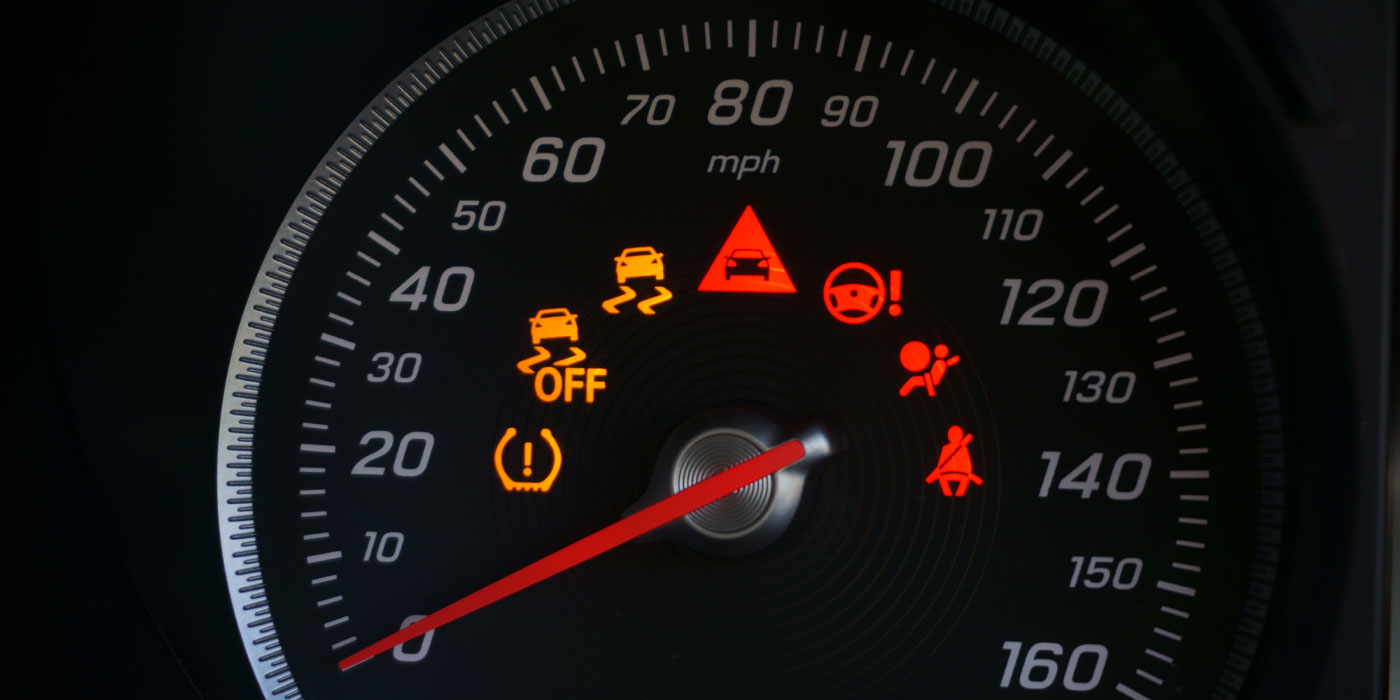
When the warning light remains illuminated despite proper inflation and reset attempts, systematic diagnosis becomes essential. These three common culprits cause most persistent warnings:
1. Sensor battery depletion (most common cause):
– Warning light stays on despite correct pressures
– Dashboard displays dashes or question marks instead of pressure readings
– Sensors typically last 7-10 years—replacement required when batteries die
2. Temperature-related false alarms:
– Warnings appear overnight during cold weather but clear after driving
– Caused by 1 PSI pressure drop per 10°F temperature decrease
– Solution: Maintain pressure 2-3 PSI above minimum during winter months
3. Sensor communication failure:
– Warning light flashes continuously for 90 seconds
– Often occurs after battery replacement or electrical work
– Requires professional diagnosis with TPMS scan tool
Immediate action: If warnings persist after verifying pressures and completing reset procedures, schedule professional diagnosis—driving with unresolved TPMS issues compromises safety and may violate vehicle inspection requirements in some states.
Replace Failed TPMS Sensors Before They Cause Safety Risks
TPMS sensors aren’t permanent—they contain non-replaceable batteries designed for 7-10 years of service. Recognizing when replacement becomes necessary prevents dangerous undetected pressure loss.
Replace sensors immediately if you notice:
– Persistent warning light despite proper inflation
– Dashes or blank fields instead of pressure readings for specific tires
– Sensor failure during relearn procedures (no horn chirps)
Critical replacement considerations:
– Replace all four sensors simultaneously even if only one fails
– Match replacement sensors to your vehicle’s specific radio frequency
– Always replace valve stems during sensor service to prevent slow leaks
– Never exceed maximum pressure listed on tire sidewall during inflation
Expert note: Aftermarket universal sensors require programming to your vehicle’s specifications—this specialized procedure typically requires professional equipment and adds $15-$30 per sensor to replacement costs.
Prevent Future TPMS Issues With These Maintenance Practices
Implement these four simple habits to maintain reliable TPMS operation and avoid unnecessary warnings:
1. Monthly pressure verification:
– Check pressures when tires are cold (before driving)
– Use a calibrated digital gauge—not gas station equipment
– Record readings to track gradual pressure loss
2. Seasonal pressure adjustments:
– Add 3-5 PSI during winter months to compensate for temperature drops
– Never exceed maximum pressure listed on tire sidewall
– Check pressures weekly during extreme temperature swings
3. Proper tire rotation protocol:
– Perform TPMS relearn after every tire rotation
– Some vehicles auto-relearn; others require manual reset
– Consult owner’s manual for vehicle-specific requirements
4. Sensor protection measures:
– Avoid potholes and curb impacts that damage sensors
– Request careful sensor handling during tire service
– Replace valve stems every 2-3 years as preventative maintenance
Decode Your Dashboard Warning Light Patterns
The TPMS warning light communicates specific diagnostic information through its illumination pattern—understanding these signals helps determine urgency:
- Steady illumination: One or more tires significantly underinflated (address within 24 hours)
- Flashing then steady: System malfunction requiring professional diagnosis
- Intermittent illumination: Marginal pressure levels or failing sensor (monitor closely)
- Dashes on display: Sensor communication failure at specific wheel position
- “Service Tire Monitor System” message: Complete system failure requiring immediate attention
Critical distinction: A flashing TPMS light accompanied by ABS or check engine lights indicates serious electrical interference or module communication failure—schedule professional diagnosis immediately as this affects multiple safety systems.
Resetting your service tire monitor system effectively requires understanding your specific vehicle’s reset method, verifying proper tire inflation first, and recognizing when professional assistance becomes necessary. By implementing these precise reset procedures and preventative maintenance habits, you’ll maintain reliable TPMS operation and avoid unnecessary service visits. Remember that persistent warnings after proper reset indicate sensor failure or system faults requiring specialized equipment—don’t ignore these critical safety signals. For complete peace of mind, schedule annual TPMS system checks during routine vehicle maintenance to ensure all sensors function properly and your safety monitoring system remains fully operational.


