
That persistent yellow flat tire warning light glowing on your BMW dashboard isn’t just annoying—it signals your vehicle’s Tire Pressure Monitoring System (TPMS) has detected pressure below the recommended threshold. Whether you’ve recently inflated your tires after a temperature drop, rotated them for even wear, or replaced a damaged tire, knowing how to reset this warning yourself saves valuable time and prevents unnecessary trips to the dealership. This comprehensive guide covers every reset method available across BMW’s model lineup, from older E-series vehicles to the latest G-series cars equipped with iDrive 8.
The flat tire warning system in BMW vehicles is designed as a critical safety feature, alerting drivers when tire pressure drops approximately 25% below the recommended specification. However, the system doesn’t always reset automatically after you address the underlying issue, leaving many BMW owners frustrated by a warning light that persists despite properly inflated tires. Understanding your BMW’s specific reset procedure—based on its model year and infotainment system—empowers you to resolve this issue quickly and confidently without professional assistance in most cases.
Why Your BMW Flat Tire Warning Stays On After Inflation
The Tire Pressure Monitoring System in your BMW continuously monitors air pressure through sensors located inside each wheel assembly. When pressure drops below threshold—typically around 25% below specification—the system triggers the warning light and displays which specific tire is affected. Several scenarios commonly cause this warning to persist after you’ve addressed the pressure issue, and understanding why helps determine whether a simple reset will work.
Low Tire Pressure After Temperature Changes remains the most frequent trigger for the flat tire warning. Temperature drops overnight can reduce tire pressure by 1-2 PSI, enough to activate BMW’s sensitive monitoring system. While inflating tires to the recommended pressure—usually found on a sticker inside the driver’s door jamb—often resolves the underlying issue, the TPMS requires manual reset to recognize the correction.
Recent Tire Rotation or Service frequently causes the warning to persist because the system learns each tire’s pressure characteristics over time. When tires move to different positions during rotation, the TPMS sensors report different pressure readings than the system expects. A proper reset allows the system to recalibrate to the new tire positions and prevents false warnings.
Failing TPMS Sensor Batteries cause warnings that won’t clear with standard reset procedures. Each sensor contains a small battery with a lifespan of 5-10 years, and when these batteries die, the sensor stops transmitting data. In this case, resetting won’t help—you’ll need to replace the faulty sensor, which typically costs $50-150 per sensor plus installation.
Quick Reset Methods by BMW Generation
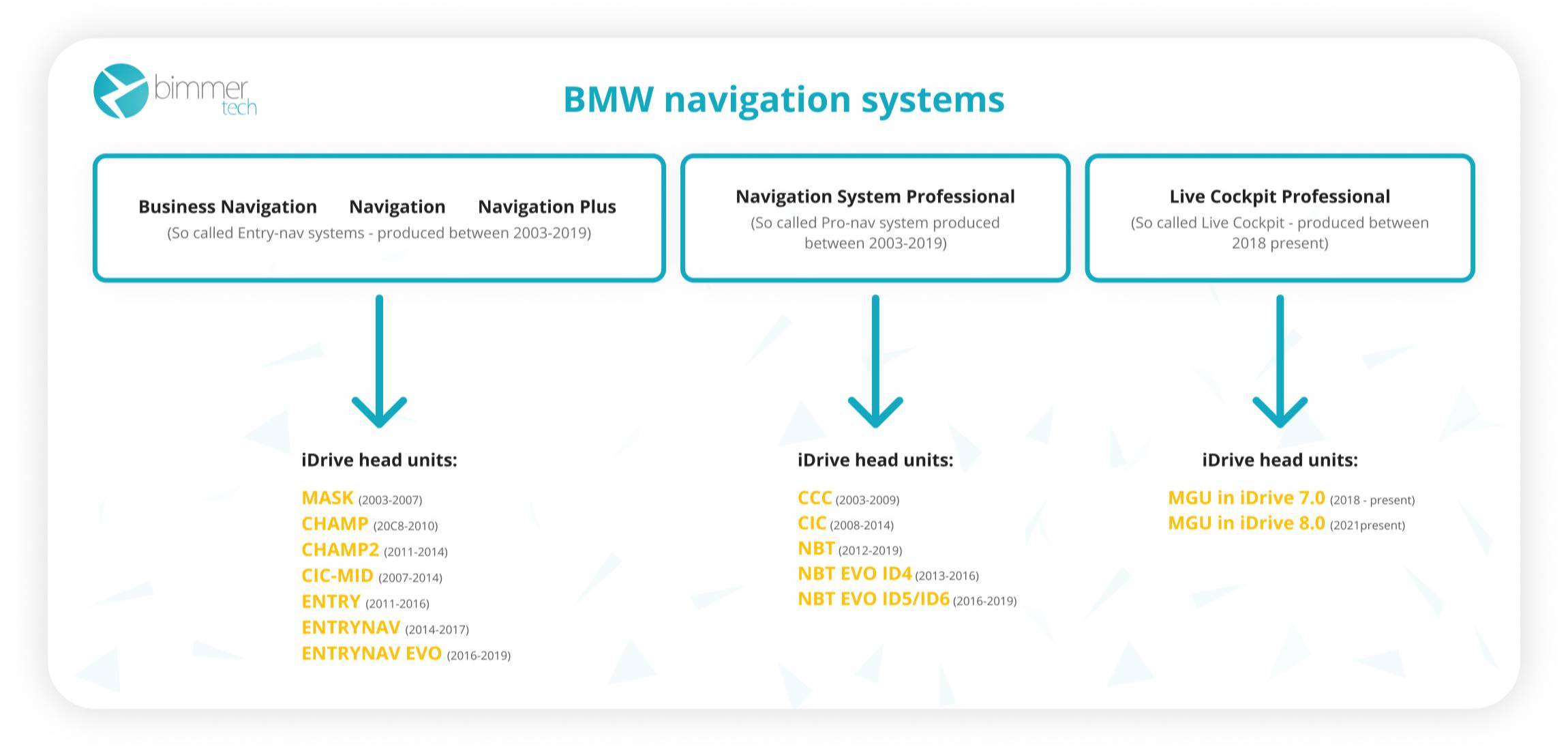
BMW has updated its reset procedures multiple times over the years, with different methods required depending on your vehicle’s model year and infotainment system. Identifying your BMW’s specific generation helps you select the correct reset procedure.
G-Series Models (2020-Present) with iDrive 7.0 and iDrive 8.0 systems require navigation through the vehicle settings menu to access TPMS reset functions. These newer models feature more sophisticated monitoring that sometimes requires the system to “learn” new sensor positions after tire service. The reset process is menu-driven but occasionally needs a short drive to complete calibration.
F-Series Models (2010-2019) equipped with iDrive 6.0 offer the most straightforward reset procedure through the vehicle information menu. Many F-series vehicles also support the traditional BC button method for quicker access without navigating complex menus—ideal when you’re in a hurry at a gas station.
E-Series Models (2002-2011) use the basic button combination on the turn signal stalk combined with the trip reset button located on the instrument cluster. These older models lack iDrive navigation entirely, making the procedure simpler but less intuitive for those unfamiliar with BMW’s unique interface.
iDrive System Reset Procedure for Modern BMWs
Modern BMW vehicles with iDrive navigation offer the most user-friendly method for resetting the flat tire warning. This procedure works on F-series, G-series, and newer E-series vehicles equipped with the Professional navigation system. The process typically takes less than two minutes and doesn’t require any tools or physical manipulation of vehicle controls.
Accessing the Tire Pressure Reset Menu
Start your BMW and allow the system to fully boot (about 30 seconds). On iDrive 7 and 8 systems, press the MENU button on your center console controller. Navigate through the interface using the rotary dial or touchpad, selecting “Vehicle Settings” from the main menu. On iDrive 6 systems, the path is similar but labeled “Car Settings” instead.
Completing the TPMS Reset Process
Within the vehicle settings menu, scroll through the options until you find “Tire Pressure Monitor” or “RPA” (Reifendruckkontrolle in German). Select this option to access TPMS-specific functions. Some newer iDrive versions place this under “Tire Condition” or “Tire Pressure” instead. Once inside the TPMS menu, you’ll see options including “Store Tire Pressure” or “Reset Tire Pressure”. Select this function to confirm that current tire pressures are correct. The system will briefly display a confirmation message such as “Tire pressures stored” or “RPA reset successful”.
Verifying Successful Reset
After completing the reset, turn off your vehicle and restart it. The flat tire warning should no longer appear in the instrument cluster. If the warning persists, double-check that all tires are properly inflated to the specifications listed on your driver’s door jamb, then repeat the procedure. Important: On BMWs with run-flat tires, the system often requires driving for 5-10 minutes at speeds above 20 mph after resetting before it fully calibrates and extinguishes the warning light.
BC Button Reset Method for Older BMW Models

For BMW vehicles without iDrive or for those who prefer a quicker method, the BC (Board Computer) button on the turn signal stalk offers an efficient reset procedure. This method works on most E-series and early F-series vehicles, though the exact button combination varies slightly between model years.
Standard BC Button Reset Procedure
Ensure your BMW is parked safely with the parking brake engaged. Do not start the engine—the procedure works with the ignition in the ON position (accessory mode). Locate the BC button on the end of your left turn signal stalk, and find the trip reset button on your instrument cluster. With the ignition switched on, press and hold the BC button on the turn signal stalk until the instrument cluster displays “RESET” or enters service mode (typically 3-5 seconds). While in this mode, continue pressing the BC button to scroll through service functions until you reach “TIRE PRESSURE” or “RPA”. Press and hold the trip reset button for approximately 3 seconds until you hear a confirmation chime.
Verification After BC Button Reset
After completing the procedure, the flat tire warning should disappear from your instrument cluster. If it remains visible, verify that all four tires are inflated to the correct pressure specification before repeating the reset. Some vehicles require a short drive at speeds above 20 mph before the system recognizes the reset—don’t panic if the warning reappears briefly during this learning phase.
Resetting After Tire Service or Replacement

Tire service scenarios often require specific reset procedures beyond the basic methods. Whether you’ve rotated, replaced, or repaired tires, understanding when and how to reset ensures your TPMS functions correctly.
After Tire Rotation
BMW recommends resetting the TPMS after every tire rotation to allow the system to relearn each tire’s position. After rotation, the old pressure readings no longer match the new tire positions, triggering a warning. Perform the standard iDrive reset or BC button procedure immediately after rotation, then drive for 10-15 minutes to allow the system to recalibrate.
After Replacing One or More Tires
When replacing tires, the new rubber may have slightly different pressure characteristics than the worn tires. After ensuring proper inflation, perform the reset procedure. Drive for several miles afterward to allow the system to adjust to the new tire’s pressure behavior. If replacing multiple tires, consider checking sensor battery life—many BMW owners replace sensors proactively when tires are changed to avoid future issues.
When Professional Reset Becomes Necessary
Certain situations require diagnostic equipment available only at BMW dealerships or qualified independent shops. Understanding these scenarios prevents frustration and helps you decide whether DIY methods will work.
Sensor Programming Requirements
Many BMW vehicles from 2012-2018 require BMW-specific diagnostic software to register new TPMS sensor IDs. Aftermarket sensors or replacement OEM sensors must be “paired” with your vehicle’s TPMS control unit using tools like BMW ISTA. If your warning persists after a manual reset following sensor replacement, professional programming may be necessary.
System Faults Indicated by Flashing Warning
If your flat tire warning flashes briefly when starting the vehicle before illuminating steadily, this indicates a system fault rather than an actual pressure issue. The flashing pattern means the TPMS cannot communicate with one or more sensors—typically due to sensor battery failure. Professional diagnosis with BMW-specific equipment identifies the specific fault.
Troubleshooting Persistent Flat Tire Warnings
When standard reset procedures fail, systematic troubleshooting identifies the underlying cause. Most persistent warnings stem from these common issues:
Verify Actual Tire Pressures with a quality gauge rather than relying on the vehicle’s own sensors. Inflate all tires to the door jamb specification (typically 32-35 PSI) and recheck after 24 hours. Temperature changes can cause pressure fluctuations that trigger warnings.
Check for Damaged Valve Stems as the valve stem assembly on BMW TPMS sensors can corrode or crack over time. Inspect each valve stem for signs of rust, cracking, or physical damage. A damaged valve stem allows slow air leaks that trigger pressure warnings, even after reset.
Key Takeaways for BMW Flat Tire Warning Reset Success
Resetting your BMW’s flat tire warning is typically straightforward when you follow the correct procedure for your model year. For most BMW owners, the iDrive menu navigation provides the most reliable reset method on vehicles so equipped—simply access Vehicle Settings, locate Tire Pressure Monitor, and select Store Tire Pressure. Older vehicles without iDrive use the BC button combination on the turn signal stalk for quick resets.
If standard procedures fail, professional diagnosis may be necessary—particularly when multiple sensor failures have occurred or for sensor programming on certain model years. Regular tire pressure maintenance, sensor health awareness, and proper reset procedures after any tire service keep your BMW’s flat tire warning system functioning as intended. By following these methods, you can confidently address this common BMW notification and maintain optimal tire performance and safety.


