
That persistent tire pressure warning light on your Chevy Silverado—the flat tire icon with an exclamation point—is your truck’s urgent signal that one or more tires has dropped below the recommended inflation level. This warning typically triggers when pressure falls 25% or more below factory specifications, compromising your safety, fuel efficiency, and tire lifespan. Learning how to properly reset this system saves you unnecessary trips to the dealership and ensures your TPMS functions correctly. Whether your light appeared after a temperature drop, tire rotation, or simply because one tire lost pressure overnight, this guide covers every method to clear it—from simple dashboard resets to complete system relearns. You’ll never have to wonder how to clear tire pressure light on Chevy Silverado again.
Verify Actual Tire Pressure Before Resetting
Before attempting any reset procedure, you must confirm your tires actually have correct air pressure—most warning lights illuminate due to genuine pressure loss rather than system malfunction.
Park your Silverado on level ground and wait at least three hours (or drive less than one mile) to ensure tires are cold for accurate readings. Remove the valve cap from each tire and press a reliable pressure gauge firmly onto the valve stem. Record readings for all four tires, comparing them to the recommended pressure listed on the sticker inside your driver’s side door jamb—most Silverado models specify 35-40 PSI for front tires and 35-45 PSI for rear tires, though heavy-duty 2500HD and 3500HD models may require higher pressures.
Inflate or deflate each tire to match specifications exactly. After adjusting, wait five to ten minutes for air to stabilize, then recheck and make final adjustments. On most Silverado models, the warning light turns off automatically within a few minutes of driving once pressures are correct. If the light remains on after verifying proper inflation, proceed with one of the reset methods below.
Reset Using Driver Information Center Controls
The primary method for clearing the tire pressure light on most Chevy Silverado models involves using the Driver Information Center buttons.
Turn the ignition to the ON/RUN position without starting the engine—for push-button start vehicles, press the start button twice without pressing the brake pedal. Locate the DIC controls, typically found on the right side of the steering wheel integrated into the turn signal lever or on a panel near the speedometer. Look for buttons labeled “MENU,” “SET/CLR,” or arrow symbols.
Press the “MENU” button repeatedly until “VEHICLE INFO” or “TIRE PRESSURE” appears on the display. Navigate to the tire pressure screen showing individual readings for each tire (LF, RF, LR, RR). With this information displayed, press and hold the “SET/CLR” button for approximately three to five seconds. The display may flash or show “TIRE LEARNING ACTIVE” confirmation. Verify the warning light has turned off and individual tire readings appear correctly.
Some Silverado models (particularly 2011-2018) use the turn signal stalk for reset. For these, insert the key and turn ignition to ON/RUN, then press and hold the button at the end of the turn signal lever for three to five seconds. The DIC will display “TIRE LEARNING ACTIVE” and the horn will chirp when each sensor is recognized.
Perform Complete TPMS Relearn After Tire Rotation
When simple DIC reset doesn’t work—or after you’ve rotated tires or replaced sensors—you need the full TPMS relearn procedure to teach your Silverado each sensor’s location.
Ensure all four tires are properly inflated to the recommended pressure specified on your door jamb sticker. Turn the ignition to ON/RUN (engine off). Access relearn mode by pressing and holding the ODO/TRIP button until “TIRE LEARN” appears on the display. Press and hold the SET button for approximately three seconds—you’ll hear the horn chirp once, indicating learn mode is active.
Starting with the left front tire, use a TPMS activation tool (available at most auto parts stores for $50-150) to send a signal to the sensor. The horn will chirp once when recognized. Repeat for each tire in sequence: left front, right front, right rear, then left rear. After the left rear tire is recognized, the horn will chirp twice, confirming completion. Turn the ignition off and verify the warning light has turned off with correct individual pressures displayed.
Clear Flashing Tire Pressure Warning Light

A solid tire pressure light indicates low pressure, but a flashing light for 60-90 seconds signals serious system malfunction requiring immediate attention. This pattern indicates TPMS has detected faults like dead sensor batteries, damaged sensors, or communication failures between sensors and the control module.
When your warning light flashes continuously, start by checking the TPMS fuse. Locate your Silverado’s fuse box (under the dashboard or engine compartment) and consult the owner’s manual for TPMS fuse location. If the fuse is blown, replace it with the same amperage rating immediately—this simple fix resolves many flashing light issues.
If the fuse is intact, the problem likely involves a faulty sensor. TPMS sensor batteries typically last five to ten years, so older trucks may have failed sensors. A scan tool can identify which specific sensor is malfunctioning. If one sensor has failed, replacing just that sensor usually suffices—budget $20-50 for the sensor plus $15-40 labor per wheel if a shop handles installation.
Diagnose Recurring Tire Pressure Light Issues
If your tire pressure light keeps returning after verified proper inflation and successful resets, you likely have a slow leak or failing sensor. Even minor leaks trigger TPMS once pressure drops below threshold.
Inflate all tires to specified pressure and apply soapy water to valve stems, bead areas, and tire sidewalls. Look for bubbles indicating air escape. Valve stems are common culprits—rubber stems crack over time, while metal stems can corrode at the base. During tire service, technicians can accidentally damage sensors if not careful—always inform your service provider your vehicle has TPMS to prevent accidental sensor damage.
Visually inspect each TPMS sensor if possible. Some mount externally on valve stems and can be examined without tire removal. Look for cracks, corrosion, or physical damage. Temperature changes significantly affect pressure—expect 1-2 PSI drop for every 10°F temperature decrease, which explains why lights often appear overnight during colder months.
Model-Specific Chevy Silverado Reset Methods

Silverado model years use slightly different reset methods—knowing your specific year ensures correct procedure:
- 2007-2010 models: Use dedicated cluster buttons—hold the SET/CLR button while in the tire pressure menu
- 2011-2018 models: Integrate controls into the turn signal stalk—hold the end button for 3-5 seconds
- 2019-2024 models: Route reset through infotainment screen—navigate to Vehicle > Settings > Tire Pressure > Reset
Silverado 2500HD and 3500HD heavy-duty models follow identical TPMS technology and reset procedures, though pressure specifications differ due to higher load ratings—some require up to 80 PSI for rear tires on dual-wheel configurations. Silverado Hybrid models follow conventional reset patterns but may show additional hybrid system screens alongside tire pressure information.
Cost Comparison: DIY Reset vs Professional Service
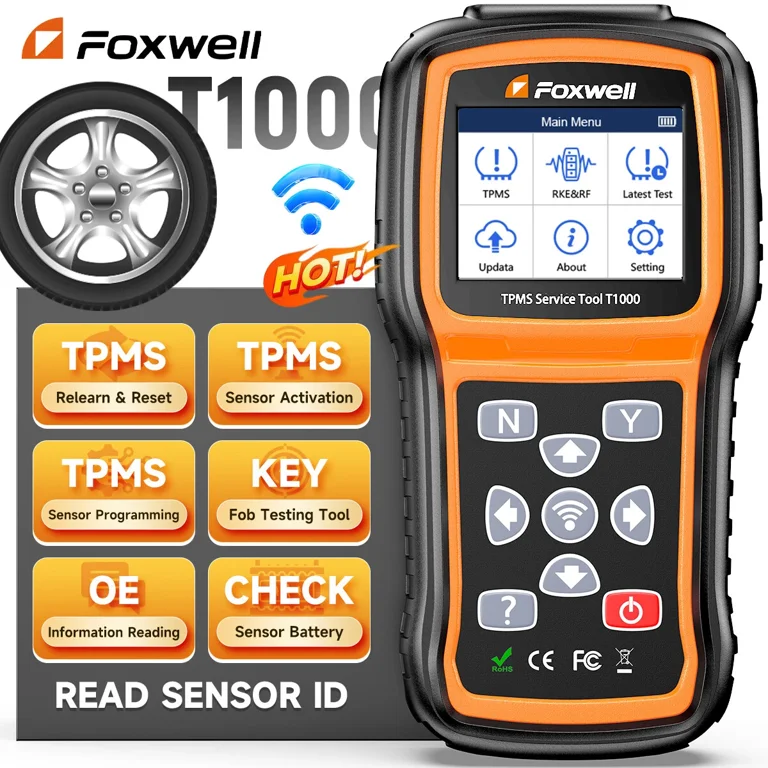
Clearing the tire pressure light yourself costs nothing beyond your time if the system functions normally. A reliable pressure gauge costs $10-20 if you don’t own one, while basic TPMS activation tools run $50-150.
Professional scan tools range from $200-$500 but offer extensive diagnostic capabilities beyond TPMS. If you prefer professional service, expect $50-$150 at a dealership for TPMS diagnostic and reset, including necessary reprogramming. Independent shops typically charge $50-$100 for the same service.
Sensor replacement costs $20-$50 per sensor for parts alone, or $40-$80 per wheel including valve stem service. Labor adds $15-$40 per wheel at most shops. If your TPMS light flashes continuously due to a failed sensor, budget $80-$150 total per sensor (parts and labor) for replacement.
Prevent Future TPMS Warning Light Activations
Regular maintenance prevents most tire pressure light issues and extends TPMS component life. Check tire pressure at least monthly and before long trips—always when tires are cold. Include the spare tire in inspections if equipped with a TPMS sensor.
Temperature changes significantly affect pressure—expect 1-2 PSI drop for every 10°F temperature decrease. In cold climates, add 2-5 PSI during winter months without exceeding maximum pressure listed on tire sidewalls.
When having tires serviced, always inform technicians about your TPMS system. Valve stems should be replaced during tire replacement since rubber stems degrade over time—budget $10-20 per stem. Ensure sensors aren’t damaged during mounting and balancing, as many shops charge small fees ($5-15 per wheel) specifically for proper TPMS handling.
If your Silverado’s tire pressure light remains on after trying these methods, the system requires professional diagnosis. A flashing light, missing individual tire readings, or a light that returns shortly after resetting all indicate sensor or system failures needing specialized tools and expertise. With this knowledge on how to clear tire pressure light on Chevy Silverado, you’ll maintain safer drives and avoid unnecessary service costs while keeping your truck in optimal condition.


