
Your Volkswagen’s dashboard holds crucial tire pressure information that most drivers never access properly. When that horseshoe-shaped TPMS warning light flashes unexpectedly during your morning commute, knowing exactly how to retrieve accurate pressure readings from your vehicle’s display could prevent a dangerous blowout or costly tire damage. Modern Volkswagen models from Jetta to Atlas feature sophisticated tire monitoring systems that provide real-time pressure data—but only if you know where to look and how to interpret what you see. This guide reveals the precise steps to check tire pressure readings on any Volkswagen dashboard, identify when readings indicate genuine problems, and reset the system after adjustments.
Locate Your Volkswagen’s Tire Pressure Menu in Under 30 Seconds
The fastest way to check tire pressure on your Volkswagen depends on your model year and infotainment system generation. For vehicles with MIB2 or earlier infotainment (typically 2018 and older models), press the “Menu” button on your steering wheel controls while the vehicle is running. Use the toggle switch to scroll through instrument cluster menus until you see “Vehicle Status” or “Car” options, then select “Tire Pressure” using the OK button. The entire process takes less than 15 seconds once you know the menu path.
Volkswagen models with MIB3 infotainment (2019 and newer) require touchscreen navigation. From the home screen, tap the “Car” icon in the bottom menu bar, then select “Vehicle Status” followed by “Tire Pressure.” Your dashboard will immediately display current pressure readings for all four tires in PSI or bar units, depending on your regional settings. Note that pressure values update every 20-30 minutes during driving—check readings after parking for the most accurate representation of cold tire pressure.
What to Do When Physical Buttons Control Your Display
If your Volkswagen lacks touchscreen capability (common in base trims), use the right-side stalk behind the steering wheel. Press the small button at the end of the stalk to enter the instrument cluster menu, then rotate the button to scroll through options. Look for the “TPMS” or tire pressure icon among the menu items. Press the button again to select and display real-time pressure values. Some older models require holding the button for 3 seconds to access this menu—check your owner’s manual appendix for model-specific variations.
Decode Your Volkswagen’s Tire Pressure Readings Accurately
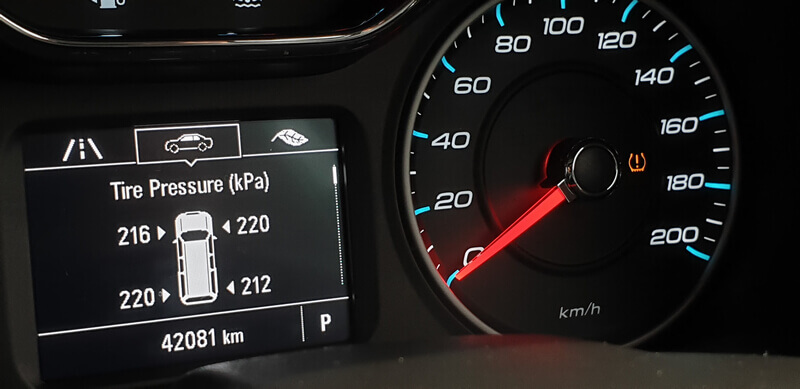
Your dashboard display shows more than just numbers—it tells a complete story about your tire health through specific visual indicators. When viewing the tire pressure screen, you’ll see a vehicle diagram with pressure values at each corner. A green checkmark next to a tire indicates pressure within 10% of the recommended specification, while a yellow exclamation point means pressure is 10-25% low. Red text with a flashing icon signals pressure is more than 25% below specification—requiring immediate attention.
How to Interpret Confusing TPMS Messages
Many Volkswagen owners panic when they see “—” instead of pressure values for one or more tires. This typically means the TPMS sensor isn’t communicating with the vehicle’s computer, often due to a dead sensor battery or electromagnetic interference. Try driving at highway speeds for 10 minutes—this often reactivates dormant sensors. If dashes persist after 24 hours, the sensor likely needs replacement. A “TPMS Malfunction” message usually indicates system calibration issues rather than actual pressure problems—reset the system before scheduling service.
Manually Verify Pressure When Dashboard Shows Inconsistencies
Your Volkswagen’s TPMS system can occasionally display inaccurate readings, especially after temperature swings or recent tire service. When your dashboard shows low pressure but tires look properly inflated, grab a digital pressure gauge and verify actual pressure. Remove each valve cap, press the gauge firmly onto the valve stem at a 90-degree angle, and read the measurement within 2 seconds before air escapes. Compare these manual readings against your dashboard display—discrepancies of more than 2 PSI indicate a sensor issue rather than actual pressure loss.
Cold Tire Pressure Check Protocol
For accurate readings, always check tire pressure when tires are cold (parked for at least 3 hours or driven less than 1 mile). Morning checks provide the most reliable measurements as overnight cooling stabilizes tire temperatures. Volkswagen recommends maintaining 32 PSI for front tires and 30 PSI for rear tires on most passenger models, but always verify specifications on the driver’s side door jamb sticker—SUV models like the Atlas often require higher pressures. Note that pressure naturally drops 1 PSI for every 10°F temperature decrease, so seasonal adjustments are normal.
Reset Your Volkswagen’s TPMS System After Pressure Adjustments
After inflating tires to proper specifications, your Volkswagen requires a TPMS reset to recognize new pressure baselines. With the vehicle running but parked, navigate to the tire pressure menu using your preferred method (steering wheel controls or touchscreen). Look for “Store Pressure” or “Set Tire Pressures” option—this appears as a gear icon on MIB3 systems. Confirm the selection when prompted, then drive at speeds above 15 mph for 2 minutes to complete system recalibration. The TPMS warning light should extinguish within this driving cycle.
Emergency TPMS Reset Method for Older Models
Volkswagens manufactured before 2015 may require physical reset button activation. Locate the small black button beneath the steering column (near the hood release) or inside the glove compartment. With the ignition in “ON” position (engine off), press and hold this button for 5-8 seconds until the TPMS warning light flashes three times. Release the button and verify successful reset by checking that the warning light turns solid for 2 seconds then turns off. This method bypasses the infotainment system for immediate recalibration.
Diagnose Common Volkswagen TPMS Dashboard Errors
When your Volkswagen displays “Tire Pressure Not Available” but no warning light appears, the system has lost communication with one or more sensors—usually due to battery failure. TPMS sensor batteries typically last 7-10 years; if your vehicle is older than 2015, sensor replacement is likely needed. A flashing TPMS light that stays illuminated after reset indicates either a damaged sensor (often from tire rotation) or interference from aftermarket electronic devices like dash cams or phone chargers.
Temperature-Related Pressure Fluctuation Fixes
During extreme temperature changes (below 30°F or above 90°F), your Volkswagen may display temporary low pressure warnings that resolve after driving 10-15 minutes. This occurs because cold tires lose 3-5 PSI while hot tires gain equivalent pressure. To prevent false warnings, adjust pressures to 2 PSI above specifications during winter months and 2 PSI below during summer heat waves. Always check pressures when tires are cold to avoid overcorrection.
Maintain Optimal Tire Pressure for Volkswagen Safety and Efficiency
Properly inflated tires improve your Volkswagen’s fuel efficiency by up to 3% and extend tire life by 25% compared to underinflated conditions. Check pressure readings through your dashboard every two weeks and verify with a manual gauge monthly. Pay special attention after seasonal changes—fall and spring typically require the most frequent adjustments due to temperature volatility. The ideal maintenance schedule involves checking pressure every time you fill your gas tank, taking less than 2 minutes using your dashboard display.
When loading your Volkswagen with passengers or cargo, consult the door jamb sticker for adjusted pressure specifications—most models require 2-4 additional PSI when carrying heavy loads. Ignoring these adjustments causes excessive tire flexing, generating dangerous heat buildup during highway driving. For long road trips, increase pressures to maximum sidewall specifications (printed on tire sidewall) before departure, then reset to normal levels upon arrival.
When to Seek Professional Volkswagen TPMS Service
Certain dashboard warnings indicate issues beyond DIY resolution. If multiple tires show “—” simultaneously, your Volkswagen’s TPMS control module has likely failed—requiring dealer-level diagnostics. After tire replacement or rotation, persistent “TPMS Not Calibrated” messages mean sensors weren’t properly registered to their new wheel positions. This requires specialized VW diagnostic equipment to reprogram sensor IDs. Additionally, if your TPMS light flashes for 90 seconds then stays solid, the system has detected an internal fault code that only a Volkswagen technician can retrieve and clear.
Your Volkswagen’s dashboard tire pressure monitoring system provides invaluable safety information when used correctly. By mastering these display navigation techniques and understanding what the readings mean, you’ll maintain optimal tire performance while avoiding unnecessary service visits. Remember to check your dashboard pressure readings monthly, verify with a physical gauge quarterly, and reset the system after any pressure adjustments—this simple routine ensures your Volkswagen delivers maximum safety, efficiency, and tire longevity throughout its lifespan.


