Your Toyota Highlander’s tire pressure monitoring system (TPMS) is designed to keep you safe on the road, but finding those specific pressure readings can be confusing if you don’t know where to look. If you’ve ever wondered “how to see tire pressure on Toyota Highlander” dashboard displays or struggled to interpret the TPMS warning light, you’re not alone. Many Highlander owners find themselves searching for this critical information when the warning light illuminates or before a long road trip. This guide reveals exactly how to access your tire pressure readings through the dashboard interface, perform accurate manual checks, and troubleshoot common TPMS issues—ensuring your vehicle maintains optimal handling, fuel efficiency, and safety.
Navigate to Tire Pressure Display on Highlander Dashboard
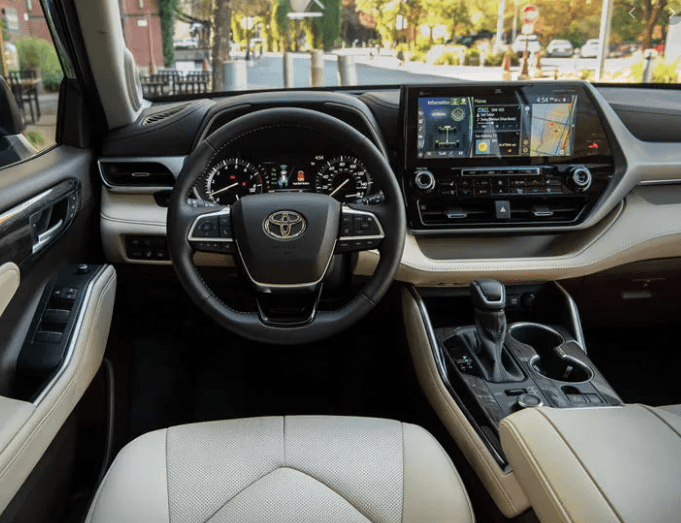
Finding your tire pressure readings on the Highlander dashboard requires knowing the specific menu path for your model year and trim level. For 2020 and newer Highlanders, press the “i” button on your steering wheel to access the multi-information display, then use the left/right arrow keys to scroll through vehicle status screens until you see the tire pressure icon, which resembles a cross-section of a tire with pressure numbers.
Locate Pressure Readings by Trim Level
Higher-end Platinum and Limited trims typically display individual pressure readings for all four tires on a single screen, showing each wheel’s specific psi value. Base LE and XLE trims may only indicate whether all tires are within proper range without showing exact numbers. If you don’t see tire pressure as an immediate option, continue scrolling through vehicle status menus—the display might be nested under “Vehicle Settings” or “Maintenance” sections depending on your model year.
Troubleshoot Missing Tire Pressure Display
If you’ve thoroughly searched all menus and still can’t find tire pressure readings, your specific Highlander trim may not support individual tire pressure display on the factory dashboard. This is common on base model years before 2020. Don’t rely solely on the TPMS warning light—without specific readings, you’ll need to perform manual pressure checks monthly to catch gradual leaks before they trigger the warning system. Check your owner’s manual for model-specific TPMS capabilities or visit a Toyota dealership to confirm whether your vehicle supports individual tire pressure display.
Read Door Jamb Placard for Correct Pressure Specifications
Your Highlander’s driver-side door jamb contains the definitive tire pressure specification for your exact vehicle configuration—never rely on generic recommendations found online. Open the driver’s door and look for a rectangular sticker on the door frame that lists the manufacturer-recommended cold inflation pressure for front and rear tires.
Interpret Your Specific Pressure Requirements
Most Highlanders require 36 psi for all tires when cold, but some model years specify 35 psi front and 33 psi rear depending on trim and wheel size. Always use the pressure listed on your door jamb placard, as it accounts for your vehicle’s specific weight distribution, tire size, and load capacity. The placard also indicates maximum load capacity and proper tire size, which you should verify when replacing tires.
Measure Pressure When Tires Are Cold
For accurate readings, check tire pressure when tires are “cold”—meaning the vehicle has been parked for at least three hours or driven less than one mile. Driving heats tires, increasing pressure by 4-8 psi above cold specifications. If you check warm tires and adjust to door jamb specifications, you’ll significantly underinflate your tires once they cool overnight.
Perform Accurate Manual Tire Pressure Checks
When your dashboard doesn’t show individual readings or you need verification, manual checking with a quality gauge provides reliable measurements. Start with a digital or dial gauge (avoid stick-type gauges which are less accurate), and follow these steps for precision:
Step-by-Step Manual Pressure Verification
- Remove the valve cap from each tire’s air valve stem
- Press the gauge firmly and squarely against the valve stem to create a tight seal
- Read the pressure immediately before air escapes (listen for a brief hiss indicating proper seal)
- Compare reading to your door jamb specification
- Add or release air as needed, rechecking after each adjustment
- Replace valve caps securely to prevent dirt and moisture contamination
Common mistake alert: Many drivers overinflate after seeing low pressure, not realizing temperature changes affect readings. Add air in 2-3 psi increments and recheck rather than filling to maximum in one go. Perform manual checks monthly—even if the TPMS light isn’t illuminated—as gradual pressure loss won’t trigger warnings until tires are 25% below specification.
Decipher TPMS Warning Light Behaviors

The TPMS warning light on your Highlander dashboard (an exclamation point inside a U-shaped bracket) communicates different messages based on its behavior. Understanding these patterns helps you respond appropriately without unnecessary panic.
Solid vs. Flashing Warning Light Meanings
- Solid illuminated light: One or more tires is significantly underinflated (typically 25% below specification)
- Flashing light for 60-90 seconds then solid: TPMS system malfunction requiring diagnostic service
- Brief illumination at startup then off: Normal system self-check—no action needed
Temperature impact: Pressure drops approximately 1 psi for every 10°F temperature decrease. If the light illuminates after a cold snap but disappears after driving, check pressures when cold and add 2-3 psi to compensate for seasonal changes. If the light remains solid after inflating tires properly, proceed to reset procedures.
Reset TPMS System After Pressure Adjustments
After inflating tires to proper pressure, your Highlander’s TPMS may need resetting before the warning light turns off. Most models automatically reset after driving 10-15 miles at speeds above 15 mph, but some require manual initiation.
Complete Reset Procedure for Persistent Warning Lights
- Inflate all tires to door jamb specifications
- Turn ignition to “ON” position without starting engine
- Locate TPMS reset button (typically beneath steering wheel or in glove compartment)
- Press and hold reset button until TPMS light blinks three times
- Start engine and drive above 15 mph for 10+ minutes to complete system relearn
If the light remains illuminated after this process, your vehicle likely has a sensor malfunction or slow leak requiring professional diagnosis. Never ignore a persistent TPMS light—it could indicate a developing safety issue.
Install Aftermarket Display for Individual Readings
If your Highlander trim lacks factory individual tire pressure display, affordable aftermarket solutions provide real-time readings for all four wheels. These systems fall into three main categories with varying installation complexity:
Non-Invasive Aftermarket Options
- Valve cap sensors: Replace standard caps with sensing units that transmit to smartphone app ($30-$60)
- External sensor displays: Magnetic or suction-cup displays that read factory sensors ($50-$100)
- Band-style sensors: Clamp around rim center without valve stem modification ($100-$200)
Pro tip: For 2019+ Platinum and Hybrid Limited models that lack factory display, choose systems operating at 433 MHz frequency to avoid interference with Toyota’s 315 MHz system. These non-invasive options won’t void your warranty and can be removed before selling the vehicle.
Maintain Optimal Pressure Through Seasonal Changes
Tire pressure fluctuates significantly with temperature changes, requiring seasonal adjustments to maintain proper inflation. Understanding these patterns prevents unnecessary panic when the TPMS light illuminates after cold weather.
Winter and Summer Pressure Management
- Winter: Check pressure weekly during temperature swings; add 2-3 psi above door jamb specification
- Summer: Avoid topping off warm tires; check and adjust only when cold
- Altitude changes: Pressure increases approximately 1 psi for every 1,000 feet elevation decrease
Critical maintenance tip: Always measure and adjust pressure when tires are cold, regardless of season. The door jamb specification represents cold inflation targets—not operating temperature pressures. Document your pressure readings monthly to identify slow leaks before they become safety hazards.
Verify Pressure After Service Department Visits
Dealership service departments sometimes adjust tire pressure during routine maintenance without consulting you, potentially setting pressures below manufacturer specifications. Always verify pressure settings before leaving the service center.
Service Department Pressure Check Protocol
- Request written confirmation of pressure settings before service
- Check pressures yourself using your personal gauge before driving away
- Politely request adjustment if pressures don’t match door jamb specifications
- Document any discrepancies with service advisor
Important warning: Some service advisors recommend lower pressure for “softer ride,” but pressures below manufacturer specifications can void tire warranties if damage occurs. Communicate your preference for door jamb specifications before service begins.
By mastering these techniques for how to see tire pressure on Toyota Highlander models, you’ll maintain optimal vehicle performance, extend tire life, and ensure maximum safety on every journey. Consistent pressure monitoring prevents premature wear, improves fuel economy, and keeps your TPMS system functioning correctly—giving you peace of mind mile after mile.