If you’ve ever wondered how to check tire pressure Hyundai Sonata owners rely on daily, you’re not alone. Proper tire inflation is one of the most critical yet overlooked maintenance tasks for Hyundai Sonata drivers, directly impacting your vehicle’s safety, fuel efficiency, and tire longevity. Your Sonata comes equipped with a sophisticated tire pressure monitoring system (TPMS) built right into the instrument cluster, eliminating the need for external gauges in most routine checks. Learning how to access and interpret these readings takes just minutes but prevents costly problems like uneven tire wear, reduced fuel economy, and compromised handling. This comprehensive guide reveals exactly how to check tire pressure Hyundai Sonata models use, from navigating the instrument cluster to understanding what the numbers mean for your daily driving experience.
Access Tire Pressure Display
Your Hyundai Sonata’s built-in tire pressure monitoring system provides real-time readings without requiring you to kneel beside each tire with a handheld gauge. This feature displays each tire’s pressure directly on your instrument cluster, giving you instant visibility into your vehicle’s tire health while seated comfortably in the driver’s position. The system continuously monitors pressure levels as you drive, but accessing the specific readings requires navigating through your vehicle’s display system.
Locate Utility View Mode
To see your tire pressure readings, you need to enter the Utility view mode on your instrument cluster display. This view serves as the command center for vehicle monitoring systems and appears when you cycle through display modes using your steering wheel controls. Look for a tire icon or “Tire Pressure” label as you scroll through available views—the system is designed to make this critical safety information immediately accessible. Pro Tip: If you struggle to find this view, consult Chapter 4 of your owner’s manual for model-specific screenshots and step-by-step navigation instructions tailored to your exact Sonata year and trim level.
Read Pressure Readings Directly
Once in Utility view, your display shows each tire’s current pressure in a clear, visual layout. The screen presents four tire icons arranged to match your vehicle’s configuration, with numerical readings beside each icon. This intuitive design makes it instantly obvious which tire requires attention if any readings fall outside the recommended range. The system updates these readings continuously, but remember that the most accurate measurements occur when tires have cooled to ambient temperature—typically after your vehicle has been stationary for at least one hour.
Navigate Instrument Cluster Menu

Understanding how to navigate your Sonata’s instrument cluster menu ensures you can configure the display to your preferences and access all available tire pressure information without frustration. The menu structure follows a logical hierarchy, with tire pressure settings nested under general vehicle configuration options.
Settings Path for Display
To configure your tire pressure display settings, follow this precise navigation pathway: Settings → General → Unit → Tyre pressure unit. Each menu level requires a selection using your steering wheel controls, with the Settings option typically appearing as a gear icon when you first access the menu system. The General submenu contains fundamental display configurations, while the Unit option specifically handles measurement preferences. This organized structure keeps related settings grouped together, preventing you from wasting time searching through unrelated menu options when you need quick access to tire pressure information.
Menu Navigation Steps
Begin by pressing the menu button on your steering wheel to access the main instrument cluster menu. Use the navigation arrows to highlight Settings, then press OK to confirm. From the Settings screen, scroll down to General and press OK again. Within General, continue scrolling until you find the Unit option—select this to view available measurement units. Finally, choose your preferred tire pressure unit from the three options provided. The system typically saves your selection automatically, so no additional confirmation is needed in most model years.
Choose Pressure Measurement Unit
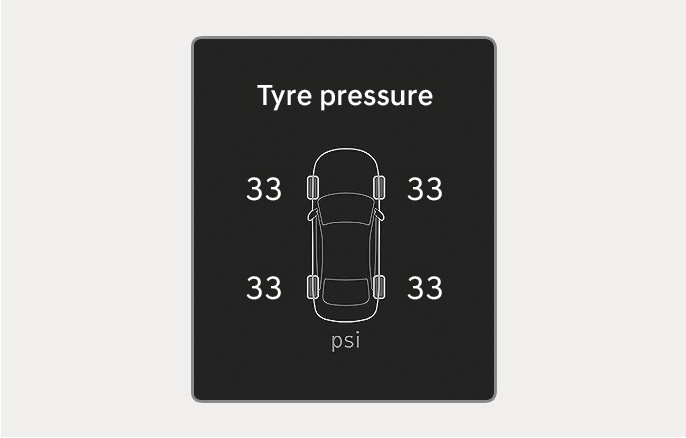
Hyundai offers three different measurement units for tire pressure display, accommodating driver preferences and regional standards. Selecting your preferred unit ensures readings make sense to you and align with pressure recommendations you encounter elsewhere. Each option represents the same physical pressure but expresses it differently, so choose the format you find most intuitive for routine maintenance.
Select PSI Unit
PSI (pounds per square inch) is the most common tire pressure measurement in the United States, making it the ideal choice for most American drivers. When you select PSI from the menu, all tire pressure readings display as whole numbers that match the recommendations on your driver’s side door jamb sticker and gas station air pumps. This consistency eliminates confusion when comparing your actual readings to manufacturer specifications, saving you time during routine checks. Critical Note: Always verify your instrument cluster is set to PSI if you’re using American references, as mixing units could lead to dangerously incorrect inflation levels.
Alternative: kPa or Bar
For drivers in metric-system countries or those preferring scientific notation, kPa (kilopascals) and bar provide alternative measurement options. Kilopascals represent the standard SI unit for pressure and commonly appear in technical documentation, while bar measurements offer a decimal-friendly alternative. If you select either metric option, your door jamb sticker will display recommendations in the same unit, ensuring direct comparability. The conversion is straightforward: 1 PSI equals approximately 6.89 kPa. Pro Tip: If traveling internationally or comparing specifications from different sources, knowing this conversion helps maintain proper inflation regardless of the unit displayed.
Check Tires When Cold
The accuracy of your tire pressure readings depends significantly on when you perform the check. Tire pressure naturally fluctuates with temperature, increasing as tires heat up from driving and decreasing when they cool down. For consistent, reliable measurements you can trust for maintenance decisions, always check tire pressure when tires are cold.
Cold Tire Requirements
A tire qualifies as “cold” when its temperature matches the ambient outdoor temperature, typically requiring your vehicle to remain stationary for at least one hour or to have driven less than one mile at low speeds. Even brief driving sessions can raise tire temperature by 10-20°F, artificially inflating pressure readings by 1-2 PSI. Checking cold tires ensures you’re seeing the baseline pressure without thermal expansion effects, giving you an accurate picture of whether your tires need adjustment. Warning: Checking pressure after driving and comparing to cold specifications creates false discrepancies that might lead to improper inflation.
Best Time for Accurate Readings
The optimal time to check tire pressure is early in the morning before your first drive of the day, when tires have cooled overnight to ambient temperature. This timing provides the most stable baseline for measurements and allows you to address inflation needs before your commute. If morning checks aren’t practical, aim to check tires after several hours of parking in a shaded area, avoiding direct sunlight that can unevenly heat tires and create misleading readings. Establishing a routine of weekly cold tire pressure checks keeps you informed about slow leaks before they become safety hazards.
Find Recommended Pressure Settings
Your Hyundai Sonata has specific tire pressure recommendations engineered to optimize handling, fuel efficiency, and tire longevity. These specifications aren’t arbitrary—they represent the precise pressure range determined through extensive testing of your vehicle’s suspension geometry and dynamics.
Door Jamb Sticker Location
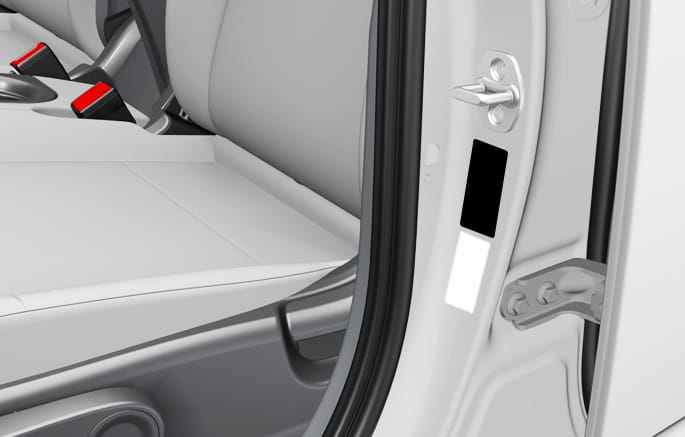
The manufacturer-recommended cold tire pressures for your Sonata appear on a sticker affixed to the driver’s side door jamb, visible when you open the driver door. This sticker lists separate pressure specifications for front and rear tires, as weight distribution and suspension tuning create different ideal pressures for each axle. The door jamb sticker displays pressures in all three available units (PSI, kPa, and bar), so you can compare directly against your instrument cluster display regardless of your selected unit. If the sticker has faded or become damaged, your owner’s manual contains identical specifications in the vehicle data section.
Front vs Rear Pressure Differences
Most Hyundai Sonata models specify different recommended pressures for front and rear tires, typically with rear tires requiring 2-4 PSI more than front tires. This difference accounts for the rearward weight bias during normal operation and optimizes contact patch distribution for stable handling. Some configurations, particularly those with temporary spare tires or specific wheel packages, may have unique specifications noted in the owner’s manual. Critical Reminder: Always verify you’re comparing your actual readings to the correct specification for each tire’s position—using rear tire specifications for front tires or vice versa leads to improper inflation and accelerated wear.
Maintain Proper Tire Pressure
Keeping your tires properly inflated delivers tangible benefits that affect your wallet, safety, and vehicle longevity. Underinflated tires create excessive rolling resistance that reduces fuel economy, while overinflated tires compromise traction and braking performance. Regular monitoring using your instrument cluster display makes proper maintenance effortless.
Benefits of Correct Inflation
Properly inflated tires wear evenly across the tread surface, extending tire life by 20% or more compared to neglected tires that develop irregular wear patterns requiring premature replacement. Correct inflation also optimizes the tire’s contact patch with the road, providing maximum grip during cornering and shortest stopping distances during emergency braking. Fuel efficiency improves measurably with proper inflation because the engine doesn’t need to work as hard to overcome the rolling resistance of underinflated tires. Beyond these practical concerns, properly inflated tires simply handle better, delivering the responsive steering and stable cornering that Sonata drivers expect.
Monthly Check Schedule
Developing a routine tire pressure check schedule takes minimal time but prevents small problems from becoming major expenses. Checking your tire pressure once per month, or before any long trip, ensures you catch slow leaks before they leave you stranded or cause damage. Your instrument cluster display makes these checks convenient—you can verify all four tires in under a minute without external equipment. If you notice a tire consistently losing pressure between checks, have it inspected for leaks, valve stem issues, or wheel damage that might be causing the slow loss.
Troubleshoot Display Issues
Sometimes the tire pressure display may show unexpected readings, missing information, or may not update as expected. Understanding common display issues and their solutions helps you maintain confidence in your monitoring system.
After Software Updates
Hyundai periodically releases software updates that can modify menu structures, option names, or navigation pathways. If your tire pressure display looks different after an update, the menu system may have been reorganized. Check the updated user’s manual included in your infotainment system for current instructions, as the printed manual that came with your vehicle may not reflect post-purchase software changes. Hyundai also provides quick reference guides that cover common functions like tire pressure monitoring in a condensed format.
When Readings Seem Incorrect
If your instrument cluster shows tire pressure readings that seem dramatically different from what you expect, verify you’re comparing cold readings to cold specifications. Ensure your instrument cluster is set to the same measurement unit as your reference pressure gauge. If discrepancies remain after accounting for these factors, the TPMS sensor might require service. In these cases, consult your Hyundai dealer for sensor testing and replacement options.
Regular tire pressure maintenance using your Hyundai Sonata’s built-in monitoring system takes just moments but delivers lasting benefits for your vehicle’s performance, safety, and your wallet. By accessing the Utility view on your instrument cluster, configuring your preferred measurement unit, and establishing a routine of checking cold tires against the door jamb specifications, you’ll keep your Sonata riding on properly inflated tires throughout its lifespan. Remember to account for software updates that might change menu navigation, and keep a manual pressure gauge available for verification when needed. Your tires—and your wallet—will thank you for the few minutes of attention this simple maintenance task requires.