Your Honda Civic’s tire pressure warning light just illuminated, and you’ve confirmed all tires are properly inflated. This frustrating scenario happens to thousands of Civic owners each year when temperature changes, tire rotations, or simple system glitches trigger false TPMS warnings. Properly recalibrating your tire pressure monitoring system takes just minutes but ensures accurate readings that protect your safety, improve fuel efficiency by up to 3%, and prevent premature tire wear. This comprehensive guide shows you exactly how to reset and recalibrate your Honda Civic’s tire pressure system for all model years from 2016 to 2024.
Locate Your Honda Civic’s TPMS Reset Controls
Before diving into recalibration, identify where your specific Civic model accesses the tire pressure monitoring system. Unlike older vehicles with physical reset buttons, most modern Civics (2016 and newer) require navigating through the infotainment touchscreen to initiate recalibration. Park your vehicle on level ground, engage the parking brake, and turn the ignition to the “ON” position without starting the engine—this powers the system while keeping the vehicle stationary.
Navigate to TPMS Settings by Model Year
The exact path to TPMS calibration varies significantly between Civic generations. For 2016-2020 models with the 7-inch display, press the “Menu” button on the touchscreen, select “Settings,” then choose “Vehicle Settings” followed by “TPMS Calibration.” Owners of 2021-2024 models with the updated infotainment system will find the option under “Settings” > “Vehicle” > “TPMS” > “Calibrate.” If you own a 2012-2015 Civic, look for a small physical TPMS reset button located beneath the steering column near the brake pedal—press and hold this for 3 seconds instead of using the touchscreen.
Confirm System Readiness Before Calibration
Your Civic’s system requires specific conditions before accepting recalibration commands. The TPMS indicator light must be illuminated (flashing or solid) to initiate the process—turning it off beforehand won’t work. Verify all four tires display current pressure readings on your instrument cluster; if any show “—” or “LOW,” address those issues first. The vehicle must be completely stationary with the transmission in “Park” (automatic) or neutral with parking brake engaged (manual). Attempting calibration while moving triggers an automatic safety lockout that requires restarting the entire process.
Inflate All Tires to Honda’s Exact Specifications
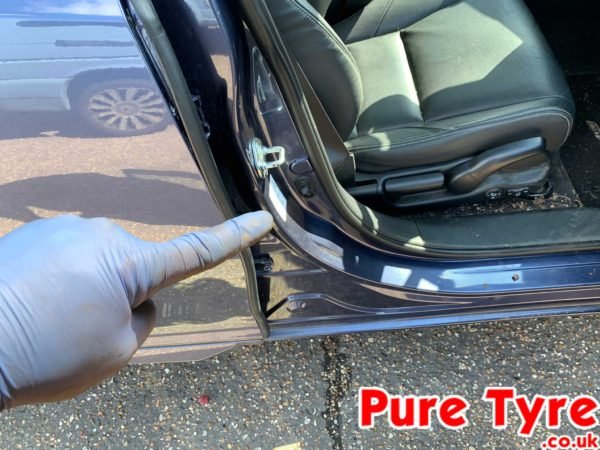
Improper inflation remains the #1 reason for failed recalibration attempts. Honda specifies different pressures for front and rear tires on most Civic trims—never assume uniform pressure across all four wheels. Locate the official pressure sticker inside the driver’s side door jamb, which lists precise PSI values for your specific model and trim. Standard LX and EX trims typically require 33 PSI front and 32 PSI rear when tires are cold, while Sport and Touring models often need 35 PSI front and 33 PSI rear.
Proper Inflation Technique Matters
Use a digital tire gauge (not the one built into your air compressor) to verify pressure after inflation. Analog gauges commonly read 2-3 PSI low, causing calibration errors. Inflate tires when they’re cold—meaning the vehicle hasn’t been driven for at least three hours or driven less than one mile. Driving heats tires, increasing pressure by 4-6 PSI temporarily. Add air in 2 PSI increments, checking frequently, as overinflation requires releasing air and starting the process again. For accurate readings, screw the gauge firmly onto the valve stem until hissing stops—partial connections give false low readings.
Critical Pressure Verification Steps
After adjusting all tires, wait 30 seconds before proceeding to allow pressure to stabilize within the tire. Double-check each tire with your gauge, comparing against the door jamb specifications. Pay special attention to the spare tire if your Civic model includes it in TPMS monitoring (2022+ models typically do). If any tire varies by more than 1 PSI from the target, adjust again before calibration. Honda’s system requires precise starting pressures—attempting calibration with even slightly incorrect pressures causes the TPMS light to return within 24 hours.
Execute the Calibration Sequence Properly
With tires properly inflated, initiate calibration through your infotainment system. On touchscreen models, select “Calibrate” and confirm with “Yes” when prompted. The system displays “Calibration Started” and the TPMS light flashes three times before turning off. For models with physical reset buttons, hold the button until the TPMS light blinks slowly (about 5 seconds), then release. Never skip the confirmation step—bypassing it stores incorrect baseline pressures.
Drive Cycle Requirements for Successful Calibration

Honda’s recalibration isn’t complete until you complete the required drive cycle. Drive continuously for 15-20 minutes at speeds between 15-65 mph, varying your speed frequently. Avoid highway speeds above 65 mph during this period, as high-speed driving generates excessive tire heat that skews pressure readings. The system collects pressure data at multiple temperatures and loads during this drive to establish accurate baselines. If you stop for more than 5 minutes during the drive cycle, the calibration resets and must be restarted from the beginning.
Verify Calibration Success with Multiple Checks
Don’t assume calibration succeeded just because the TPMS light turned off. Perform these verification steps after completing your drive cycle: First, restart the vehicle and confirm the TPMS light remains off during the 30-second startup sequence. Second, check the tire pressure display through your instrument cluster by pressing the “Display” button on the steering wheel until pressure readings appear. All four tires should show values within 1 PSI of your manual measurements.
Troubleshooting Verification Failures
If pressure readings show “—” for any tire after calibration, the system didn’t recognize that sensor. Drive an additional 5-10 minutes at 25-45 mph while gently swerving left and right to activate all sensors. If one tire consistently shows 5+ PSI different from your gauge reading, that sensor may need replacement—the system can’t calibrate against faulty data. Persistent TPMS warnings after multiple calibration attempts indicate either a malfunctioning sensor or incorrect initial inflation pressures.
Recalibrate After Every Tire Service Event

Most Civic owners don’t realize that tire rotations require recalibration because sensors move to new positions. After rotating tires, repeat the full calibration process even if pressures haven’t changed. The system must relearn which sensor corresponds to each wheel position—front left, front right, rear left, rear right. Failure to recalibrate after rotation causes incorrect tire identification in warning messages.
Special Considerations for New Tires or Sensors
When installing new tires, always reset the TPMS after mounting. New tires have different pressure characteristics than worn ones, requiring fresh calibration. If replacing a TPMS sensor (common when sensors fail at 7-10 years), the system needs special programming that often requires dealer equipment. After sensor replacement, perform calibration but expect to drive 50+ miles before the system fully recognizes the new sensor. Some 2020+ models require activating the new sensor with a magnetic trigger tool before calibration begins.
Diagnose Common TPMS Warning Scenarios
The TPMS light behaves differently depending on the issue. A solid light indicates one or more tires are 25% below recommended pressure. A flashing light that becomes solid means the system has detected a fault in the monitoring system itself, not actual low pressure. If the light flashes for 60-90 seconds when starting the car then stays off, your system needs recalibration. If it stays illuminated constantly, check actual pressures immediately.
Temperature-Related False Alarms
Sudden temperature drops overnight frequently trigger false TPMS warnings. For every 10°F temperature decrease, tire pressure drops approximately 1 PSI. A 30°F drop from day to night can lower pressure by 3 PSI—enough to trigger warnings on borderline tires. Instead of immediately adding air, drive 10-15 minutes to warm the tires, then check pressure. If it returns to spec when warm, recalibrate the system rather than adding air, which would cause overinflation once tires heat up.
Establish a Proactive Tire Maintenance Routine
Prevent most TPMS issues with this simple monthly routine: Check tire pressure every first Saturday morning using a digital gauge. Rotate tires every 5,000-7,500 miles and recalibrate immediately afterward. Inspect tires for embedded nails or slow leaks by listening for hissing sounds and checking for debris. Keep a tire inflator with pressure gauge in your trunk for emergencies—Honda recommends never driving more than 50 miles on a temporarily inflated tire.
Advanced Maintenance Tips from Honda Technicians
Seasoned Honda technicians recommend these lesser-known practices: After calibration, drive through a car wash to cool tires rapidly—this helps the system establish accurate cold pressure baselines. When storing your Civic for extended periods, inflate tires 3-5 PSI above normal to compensate for natural pressure loss. For winter driving, temporarily increase pressures by 3 PSI (but recalibrate after returning to normal conditions). Always recalibrate after significant altitude changes—every 1,000 feet elevation gain reduces tire pressure by approximately 0.5 PSI.
Final Verification Checklist: Confirm all tires match door jamb specifications, complete the 15-minute variable-speed drive cycle after initiating calibration, and verify accurate pressure readings on your instrument cluster. Remember that seasonal temperature shifts, tire rotations, and any service work require immediate recalibration to maintain system accuracy. Consistent monthly pressure checks prevent 92% of TPMS-related issues according to Honda’s service data—making this simple maintenance task one of the most valuable habits for Civic owners.