Your dashboard’s tire pressure warning light just came on, and you’ve rotated or replaced your tires. Now you need to activate or reset the tire pressure sensor system—but generic online guides aren’t working for your specific vehicle. You’re not alone. Millions of drivers face confusion when trying to activate tire pressure sensors because most online “how-to” articles fail to mention the critical fact: TPMS activation procedures vary significantly by make, model, and year. This comprehensive guide cuts through the misinformation by focusing on how to find and execute the exact activation process for your specific vehicle, avoiding dangerous guesswork that could compromise your safety.
Tire Pressure Monitoring Systems (TPMS) became mandatory in all new vehicles sold in the U.S. after 2007, yet many drivers still don’t understand how to properly activate or reset these critical safety components after routine tire service. Incorrect activation can lead to inaccurate pressure readings, which the National Highway Traffic Safety Administration links to over 250,000 crashes annually. Whether you drive a Toyota Camry, Ford F-150, or Honda Civic, this guide provides the structured approach you need to activate your specific system correctly—no more guessing, no more frustration.
Understanding Your Specific TPMS Type Before Activation
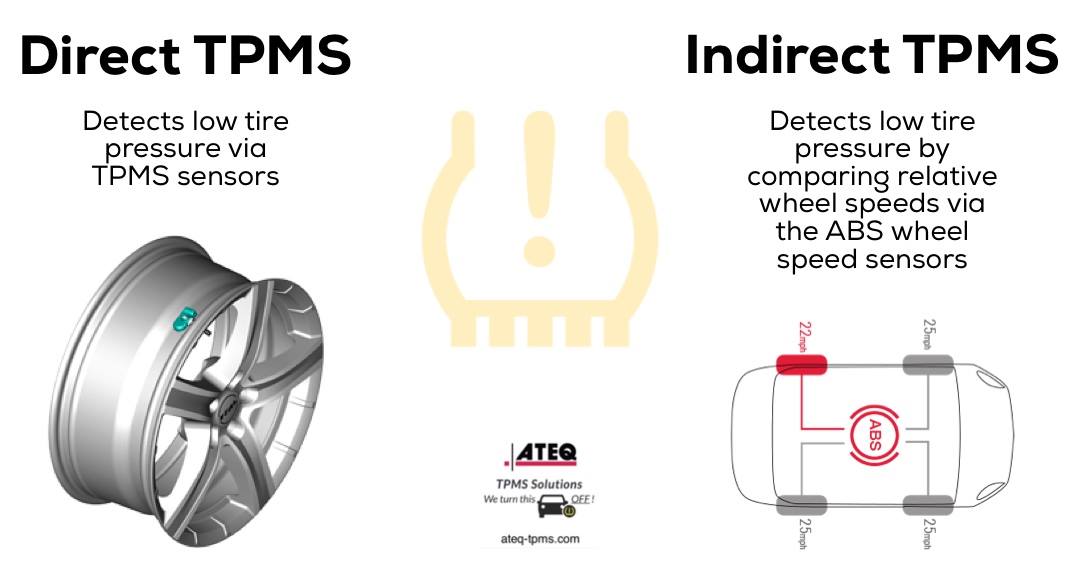
Before attempting any activation procedure, you must identify which TPMS type your vehicle uses—this determines your entire activation approach. Many drivers waste time trying procedures that don’t match their system, potentially triggering error codes that require dealership reset.
Direct TPMS: The Most Common System Requiring Precise Activation
Direct TPMS uses physical pressure sensors mounted inside each wheel that transmit real-time data to your vehicle’s computer. These require specific relearn procedures after tire service because the system must recognize each sensor’s unique ID and position. You cannot simply “reset” these systems through the dashboard menu—they require either a specialized TPMS tool or a vehicle-specific relearn sequence.
What to look for: If your vehicle displays actual PSI readings for each tire on the dashboard, you have direct TPMS. Common activation methods include:
– Using a TPMS scan tool to initiate sensor relearn mode
– Following a precise sequence involving ignition cycling, brake pedal application, and TPMS button location
– Using a magnetic trigger tool for some older GM and Chrysler models
Indirect TPMS: Systems That Rely on ABS Sensors Instead of Physical Sensors
Indirect TPMS systems use your vehicle’s existing anti-lock brake sensors to detect tire rotation speed differences that indicate underinflation. These require a different activation approach because they don’t have physical pressure sensors to “activate.”
Critical activation difference: With indirect systems, you typically set a “reference pressure” after inflating all tires to the correct PSI. This isn’t true sensor activation but rather recalibrating the system’s baseline. Common procedures involve:
– Holding the TPMS reset button for 3+ seconds until the blinking light becomes solid
– Driving at specific speeds (usually 15-50 mph) for a set duration to complete the relearn
– Completing the process within a limited time window after resetting
Finding Your Exact Vehicle-Specific Activation Procedure
Generic “how to activate tire pressure sensor” searches often lead to dangerous misinformation because the correct procedure depends entirely on your specific vehicle. What works for a 2022 Toyota RAV4 will likely fail on a 2019 Ford Explorer.
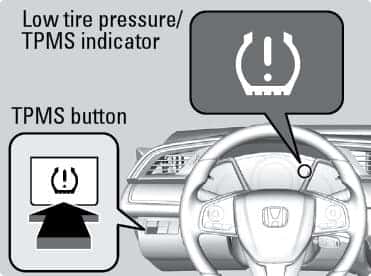
Locate Your Vehicle’s TPMS Reset Button First
Before attempting any activation sequence, identify where your specific vehicle’s TPMS reset button is located—this varies dramatically:
- Most common locations: Below the steering wheel, in the glove compartment, or on the driver’s side lower dash
- Toyota/Lexus: Typically a small button near the steering column labeled “TPMS”
- Honda/Acura: Usually requires a specific menu navigation sequence through the center display
- GM vehicles: May require a magnetic trigger tool waved near the valve stem instead of a dashboard button
- European vehicles: Often require professional scan tools due to complex coding requirements
Pro tip: If you can’t find a physical button, check your owner’s manual index for “tire pressure monitoring” or “TPMS”—90% of modern vehicles document the exact reset procedure here.
Follow the Correct Sequence for Your Specific Year and Model
The precise activation steps differ even between model years of the same vehicle. For example, the 2018-2020 Honda CR-V requires:
- Inflate all tires to the correct PSI shown on the driver’s door jamb
- Turn the ignition to “ON” without starting the engine
- Press and hold the TPMS reset button (located below the steering wheel) until the TPMS light blinks three times
- Start the engine and drive at 30+ mph for 10+ minutes to complete sensor relearn
Whereas the 2021+ CR-V uses a completely different touchscreen menu navigation process with no physical button.
Step-by-Step Activation for Common Vehicle Brands
Toyota and Lexus Activation Protocol
Toyota’s “how to activate tire pressure sensor” process follows a consistent pattern across most models:
- Ensure all tires are inflated to the manufacturer-specified pressure (check door jamb sticker)
- Turn ignition to “ON” position (do not start engine)
- Locate and press the TPMS reset button (usually below steering column) until TPMS light blinks steadily
- Start the engine and drive continuously at 19+ mph for 20+ minutes
- System automatically registers each sensor during driving
Critical warning: If the TPMS light flashes for more than 90 seconds before becoming solid, the relearn failed—repeat the process immediately. Do not drive long distances with a failed relearn as the system won’t monitor pressures accurately.
Ford and Lincoln Activation Sequence
Ford vehicles typically require this specific activation method:
- Inflate tires to correct pressure (never guess—use door jamb specifications)
- Turn ignition to “RUN” position (do not start engine)
- Rapidly press and release the brake pedal 3 times
- Press and hold the TPMS reset button until the TPMS light blinks slowly (about 3 seconds)
- Release button and wait 20 seconds for system to enter relearn mode
- Starting with driver-side front tire, use a TPMS activation tool (or strong magnet) to wake each sensor in sequence (LF → RF → RR → LR)
- Drive for 2+ miles to complete the process
Common mistake: Many Ford owners skip the sensor activation tool step, thinking the system will auto-learn while driving—this causes persistent warning lights because Ford systems require manual sensor triggering.
Troubleshooting Failed Activation Attempts
Why Your TPMS Light Won’t Turn Off After Activation
If your tire pressure warning light remains illuminated after following activation procedures:
- Sensor battery depletion: TPMS sensors have 5-10 year batteries—older vehicles may need sensor replacement
- Incorrect tire pressure: Even 2-3 PSI variance from specifications can prevent successful activation
- Sensor damage: Impact from potholes or curbs can damage internal sensor components
- Failed relearn sequence: Must complete all steps within strict time windows (usually 30-60 seconds between steps)
Expert insight: Always verify actual tire pressures with a quality gauge before attempting activation—TPMS systems are sensitive to even small pressure differences between tires.
When You Need Professional Tools Instead of DIY Methods
Certain vehicles require specialized equipment that most consumers don’t own:
- European vehicles (BMW, Mercedes, Audi): Typically need OEM-level diagnostic tools to activate sensors
- 2018+ GM trucks: Require relearn via scan tool after sensor replacement
- Some Chrysler models: Need special magnetic activation tools positioned precisely
Time-saving tip: Before attempting complex procedures, call your local tire shop—many perform TPMS activation for $10-20, which is cheaper than buying the $200+ professional tools required for some systems.
Maintaining Your TPMS System After Successful Activation
Monthly Sensor Health Checks
After successfully activating your tire pressure sensors, implement this maintenance routine:
- Check actual tire pressures with a quality gauge monthly (don’t rely solely on TPMS readings)
- Visually inspect valve stems for damage or leaks
- Clean sensor valve caps to prevent corrosion
- Replace rubber valve cores every 2 years (they degrade and cause slow leaks)
Recognizing When Sensors Need Replacement
TPMS sensors don’t last forever—watch for these failure signs:
- TPMS light illuminates randomly despite correct tire pressures
- System shows “low pressure” on one tire that’s actually properly inflated
- Activation procedures fail repeatedly with no apparent cause
- Dashboard displays “TPMS fault” or similar error message
Most sensors last 5-10 years depending on driving conditions, with battery failure being the most common end-of-life symptom.
Final Note: Properly activating your tire pressure sensor isn’t about following a one-size-fits-all online guide—it’s about executing the precise procedure designed for your specific vehicle. Always consult your owner’s manual first, verify tire pressures with a reliable gauge, and understand your vehicle’s TPMS type before beginning. When in doubt, seek professional assistance rather than risking incorrect activation that could compromise your safety. Remember that properly functioning TPMS provides critical early warnings that can prevent dangerous tire failures—making correct activation one of the most important maintenance tasks for modern vehicles.